
An agency can check every client site for what website lawsuits cite without logging in to anything: the accessibility failures in the page code that Americans with Disabilities Act, ADA, complaints list, and the tracking scripts that fire before consent that California Invasion of Privacy Act, CIPA, complaints describe. Suitcast counts 851 accessibility and 410 tracking lawsuits in the 12 months to September 22, 2026.
What website lawsuits cite, and where agency work shows up
Website lawsuits describe the site as a visitor meets it, which makes them a description of the work an agency ships. An ADA website complaint lists barriers a blind visitor met with a screen reader: images with no description, links and buttons with no text, form fields with no label, pages with no title. A CIPA complaint describes tracking scripts, such as an ad pixel or session replay, that sent a visitor's activity to a third party before the visitor agreed in the cookie banner. Suitcast sorts those complaints under two sections of the California Penal Code: section 631, on wiretapping, and section 638.51, on pen registers.
Both are common and concentrated. Suitcast's dataset holds 851 verified website accessibility filings and 410 website tracking filings in the 12 months to September 22, 2026. The firms page shows 78 plaintiff firms named on federal website lawsuit dockets over the same 12 months, and the five most active account for 65% of those dockets. Accessibility firms and tracking firms are different firms: Equal Access Law Group leads accessibility with 266 dockets and Bursor & Fisher leads tracking with 48.
Firms that file in volume reuse the same list of failures from one complaint to the next, and the firm pages publish it. Gottlieb & Associates' complaints, for example, most often cite pages with no title, images with no description and links with no text, each in 133 complaints in the 12 months to September 22, 2026. Every one of those lives in a theme, a template or a page editor.
Which agency changes create the findings
Most findings trace back to a change someone made to the site: a new theme, a new form, a campaign tag, a content upload. Knowing which change produces which finding tells an agency where to look first and who fixes it.
| Change to the site | What it can add | What a complaint would cite | Where the fix lives |
|---|---|---|---|
| New theme or template | Icon links and buttons with no text, a missing page title | Links and buttons with no name; pages with no title | The theme's header, footer and page templates |
| New contact or booking form | Fields with a placeholder and no label | Form fields with no label | The form builder's field settings |
| Content upload by the client | Images with no alt text | Images with no description | The alt text field in the page or media editor |
| Campaign tag for Meta, TikTok or Google Ads | A pixel that loads on page open | Tracking before consent | The tag manager trigger or the consent tool |
| Session replay for UX research | A recorder that starts on page open | Recording visits before consent | The replay tool's start setting, gated on consent |
| Plugin, app or theme update | A banner that no longer holds scripts back | Tracking before consent, after reject | The consent tool's script blocking |
Read the table from the change you shipped last. The client's own edits count as changes too: a new blog post with photos, a landing page a marketer built in the page editor, a booking widget the front desk asked for. An agency that knows when each of those happened can match a new finding to its cause in minutes.
The first three rows are accessibility and are fixed once per template, so one fix covers every page built on it. The last three are tracking and are fixed in one place, the tag manager or consent tool, which the cookie banner test guide walks through. The tracker guide lists the scripts complaints name most.
How to check a client site in an hour
A first check needs no access to the client's accounts, only a browser and the public address. W3C's Easy Checks page describes a first review of the same kind and says plainly that its checks are quick rather than definitive. These steps are what an agency can do for each site, in order:
- Open the site in a private window with the browser's network panel open. Before touching the cookie banner, look for requests to ad and analytics hosts. Then click reject and watch whether they keep going.
- Tab through the home page and one form with the keyboard. Every link, button and field should be reachable and show where focus is.
- Turn on a screen reader on one page with a form. VoiceOver on a Mac or NVDA on Windows says what each field is; a field announced as "edit text" has no label.
- Run an automated scan. Suitcast's free scan reads 5 pages of the site in a real browser, lists every tracker that fired before consent with its timing and host, and every accessibility failure with the element as it appears in the code and the pages it is on. The ADA check guide explains what a scan finds and what only a person can test.
- Group the findings by template, fix, and scan again. One fix in a header template can clear the same failure on every page.
The Justice Department's web accessibility guidance says automated checkers need to be used carefully and that a "clean" report does not necessarily mean everything is accessible, which is why steps 2 and 3 come before the scan, not after it.
The free scan runs once a day per site and up to five times a day from one IP address, so an office checking a list of client sites gets through five a day. It reads public pages only, respects robots.txt and never submits a form; the scanner policy says what it does and does not touch.
What to put in the report you send a client
A client report is most useful when it is dated, specific and says what it cannot show. Each finding in it should name the failure in plain words, the element or script, the pages it is on and the fix, so the client's team or the agency's developer can act without a second meeting.
Suitcast's reports are built that way, and the PDF of each carries the site, the date and the number of pages scanned. On Pro, it also carries the agency's name: enter it once in Settings, up to 80 characters, and every PDF reads "Prepared by" with that name, as below. The weekly email for each site carries it too.
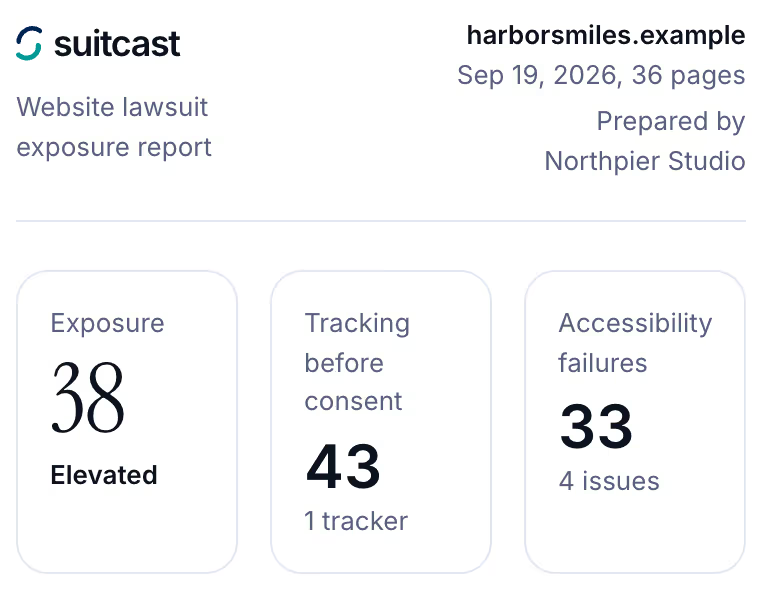
Order the findings the way the client will fix them. Put first what one change fixes everywhere, such as a pixel in the tag manager or an icon link in the header, then what needs the client's editors, such as alt text on each image. Give each an owner: the agency, the client's team, or a vendor whose app added the script.
Say in the report what a scan cannot find, and repeat the date. A report that says "Meta Pixel fired before consent on 2 of 36 pages on September 19" is a fact the client can act on; a report that says the site is fine is a promise no scan can keep.
Monitoring several client sites in one place
A site that was clean in March can fail in April, because a client uploads images, a marketer adds a tag or an update changes the theme. Checking once is a snapshot; checking every week is what catches the change before a letter does.
Suitcast's Pro plan monitors five sites from one account for $79 a month or $790 a year. Each site is scanned every week, up to 100 pages, and on demand with "Scan now". The dashboard lists every site with its last scan, its score and the change since the week before, as in the capture below. Each site gets its own weekly email saying what is new, what was fixed, what came back after being marked fixed, and which new filings match the site by state, industry or issue. Every report stays in the site's history with its PDF.
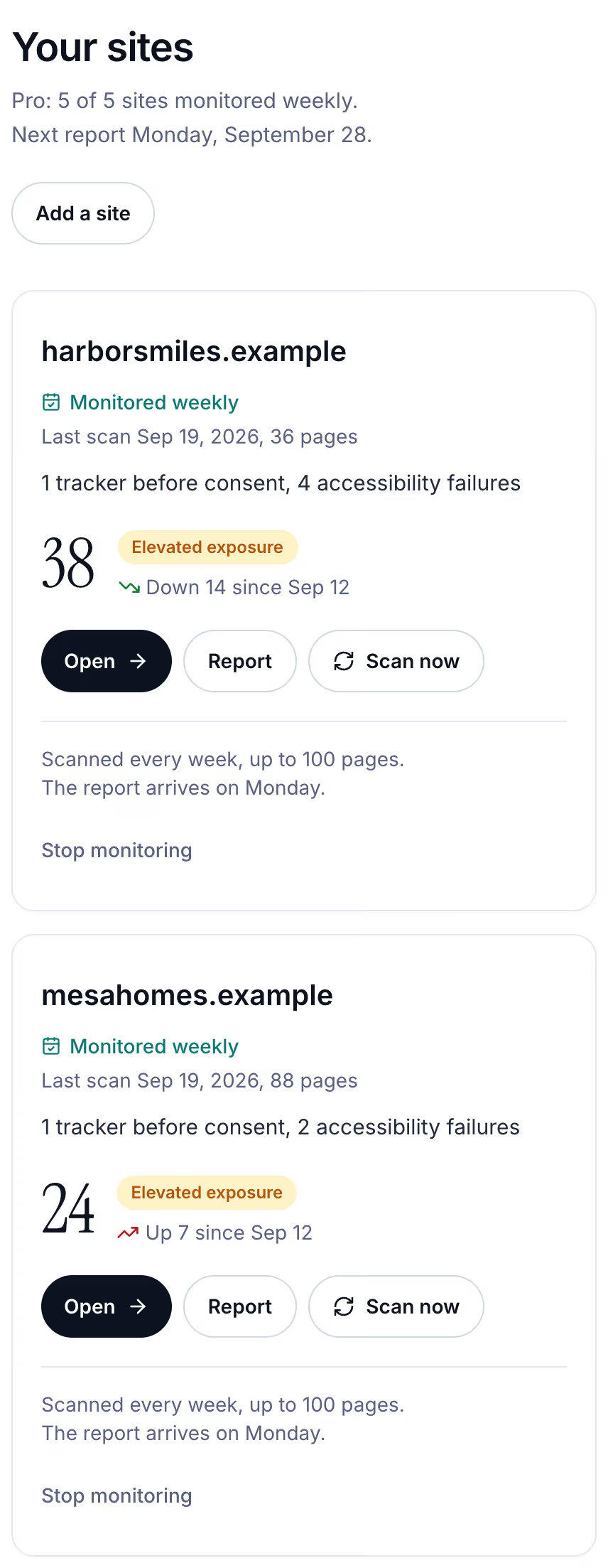
The economics are plain. Monitoring the same five sites one by one on Monitor costs five times $39 a month; Pro covers them for $79 a month, and annual billing is two months free. An agency with 20 client sites can put its five most exposed on Pro, such as a dental group on WordPress or a Shopify store running Meta and TikTok ads, and give the rest a free scan each month. The pricing page shows both plans and the founding price while spots last.
Limitations
An automated scan finds failures and scripts that code can measure, on the pages it reads, on the day it runs. It cannot judge whether alt text is meaningful, whether a checkout works by keyboard, or what a consent tool does for a visitor from another state, and a clean result does not mean a site meets the ADA or any privacy law.
Who is responsible for a client site's accessibility or tracking is set by the agency's contract and the law, not by a report; ask a lawyer before promising a client anything about lawsuits. The counts here are verified federal filings plus sourced state filings as of September 22, 2026, so they are a floor; state-court coverage is partial, and the methodology page states every rule. Nothing here is legal advice.
Suitcast identifies risk indicators. It is not legal advice and does not determine compliance.
Last updated September 22, 2026.