
To test whether your cookie banner blocks trackers, open your site in a private window with the browser's network panel recording and do not click anything. If requests go to Meta, Google, TikTok or another tracker before you choose, the banner is not blocking them. Then click reject and reload: anything still sending is what California privacy complaints describe.
What a CIPA complaint says your website did
A website tracking lawsuit is a claim under the California Invasion of Privacy Act, CIPA, that a script on a site recorded a visitor or sent their data to a third party before the visitor agreed. Suitcast counts 414 verified website tracking filings in the 12 months to September 16, 2026, on its dataset page, and about three in four are filed in California courts against companies located anywhere.
Two sections carry most complaints. Section 631(a) covers anyone who, "without the consent of all parties", reads or learns the contents of a communication in transit. Section 638.51 prohibits installing a pen register without a court order, which complaints apply to scripts that collect an IP address or device identifier. Section 637.2 lets an injured person sue for $5,000 per violation or three times actual damages, whichever is greater, and says actual damages are not required.
Consent is at the center of section 631(a), and consent is what a cookie banner is supposed to collect. The allegation is not that a site lacked a banner. It is that the scripts ran before the visitor agreed.
The scripts complaints name are ordinary marketing tools. On Suitcast's trackers page, in the 12 months to September 16, 2026, Google Analytics 4 is named in 166 verified complaints, the Google Ads tag in 161, Meta Pixel in 141 and TikTok Pixel in 118. Bursor & Fisher, named on 49 federal website tracking dockets in that window, most often cites Google Analytics 4, the Google Ads tag and Meta Pixel.
A note on new law: SB 690 was approved by the Governor on September 30, 2026. From January 1, 2027, only the Attorney General may sue a private actor over section 638.51 claims arising from a website or app; section 631 claims are unchanged. The SB 690 guide explains what changed and what did not.
Why a banner on the page is not the same as blocking
A banner on the page and a banner that holds the scripts are different things. Three common setups show a banner and still send data before a choice.
The notice-only banner. "By using this site you agree to cookies" with a single OK button. It informs, it does not ask, and every script loads with the page.
The banner nobody wired up. The banner offers accept and reject, but the scripts were pasted into the theme, added by an app, or placed in Google Tag Manager without a consent requirement, so they fire whatever the visitor picks. Shopify's help center says it plainly: pixels installed by hand or through apps may need "custom logic to ensure they are honoring customer consent." Wix and Squarespace leave pasted code outside their banners in the same way, as the Squarespace and Wix banner guide shows.
The banner that is not shown to US visitors. Shopify's automated settings configure its cookie banner for visitors in the UK and the EEA, and the Shopify help center says the banner "will not be active" in other regions by default, naming the US as an example. A store can have a banner in its settings that a visitor in California never sees. The Shopify cookie banner guide walks through the region setting and what it does not reach.
A fourth case surprises owners who did everything right. Google's consent mode documentation describes two versions. Basic consent mode blocks Google tags until the visitor interacts with the banner and sends no data before then. Advanced consent mode loads the tags when the page opens and, while consent is denied, still sends measurements without cookies. On a site using advanced mode, requests to Google appear before any click.
How to test your cookie banner in five minutes
You need a desktop browser. These steps use Chrome; Firefox and Safari have the same panels under similar names.
- Open a private window (Command+Shift+N on a Mac, Control+Shift+N on Windows), so no earlier choice is remembered.
- Open the developer tools (Command+Option+I on a Mac, Control+Shift+I on Windows) and select the Network tab. Tick Preserve log.
- Load your home page and do not touch the banner. Wait ten seconds.
- Type a tracker's address into the filter box, one at a time:
facebookfor Meta Pixel,google-analyticsandgoogletagmanagerfor Google Analytics and tags,googleadsanddoubleclickfor Google Ads,tiktok,clarity.ms,hotjar,licdnfor LinkedIn. Any row that appears was sent before you chose. - Check the cookies under the Application tab, Cookies. A
_gacookie means Google Analytics ran; a_fbpcookie means Meta Pixel ran. - Click reject (or "necessary only"), reload, and repeat step 4. Rows that still appear keep firing after the visitor said no, which is the stronger allegation.
- Repeat on a product page and a contact page. Tags are often limited to certain templates, and forms attract the scripts that capture typing.
If there is no reject button at all, note that too. A banner with only accept cannot record a refusal.
What the free scan records about your banner
Suitcast's free scan runs the same test on up to 5 pages of your public site and writes it down with timing. For each page it records every request from the moment the page starts loading until the network goes quiet or 8 seconds pass, without clicking anything, and matches each request against the 43 tracking scripts in its catalog. Then it looks for a consent banner, including the common ones from OneTrust, Cookiebot, Osano, Didomi, Usercentrics, iubenda, TrustArc, Ketch, CookieYes, Complianz and Termly, presses reject when the banner offers it, never accept, and watches 3 more seconds.
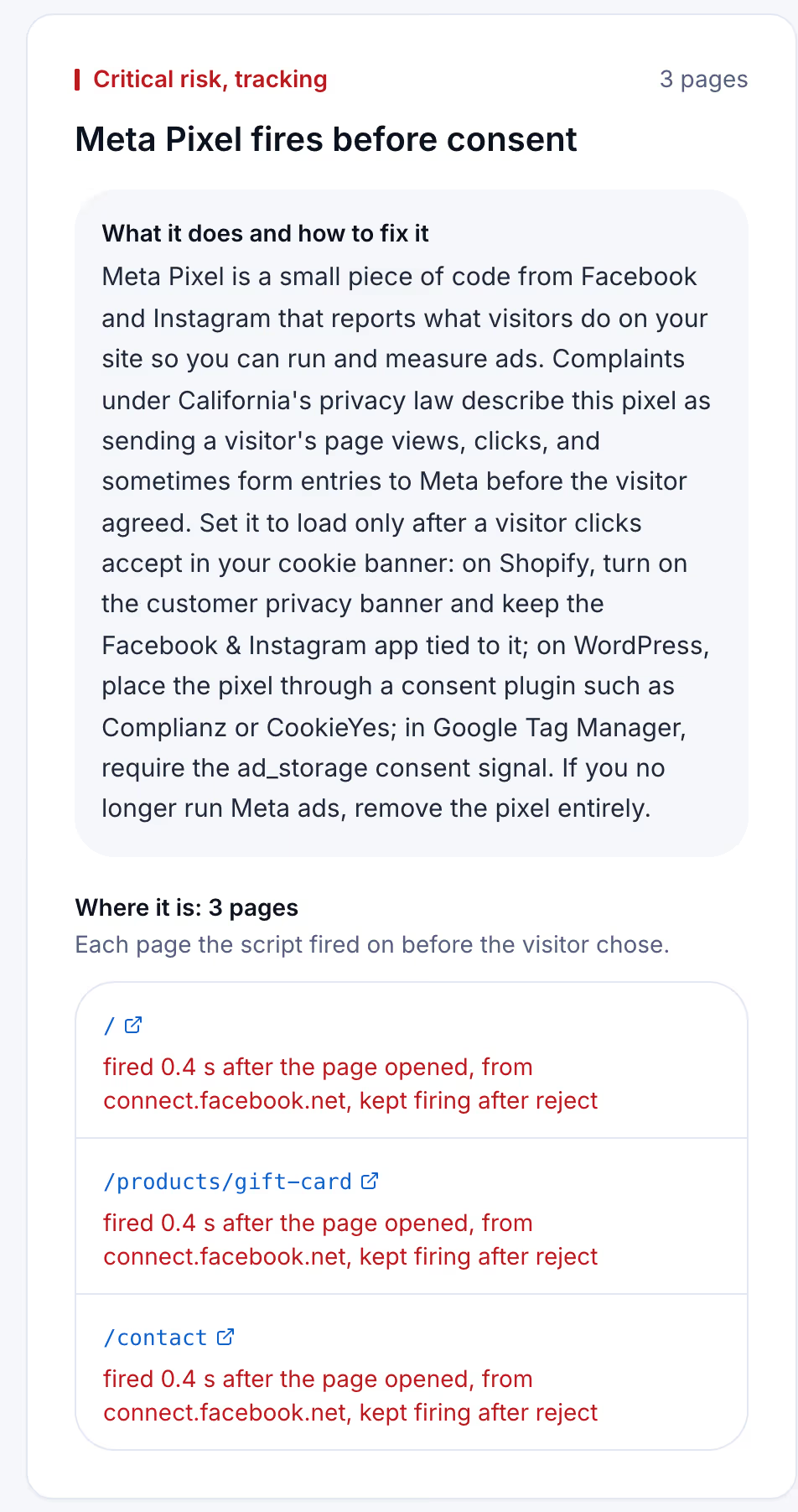
Each finding names the script, the pages it fired on, how many seconds after the page opened, the address it loaded from, and whether it kept firing after reject. When the banner has no reject button, the report says so instead of guessing. The fix beneath each finding names where the setting lives, such as Shopify, WordPress or Google Tag Manager.
The report is dated. After you change the banner, a second scan shows the difference with its own date, which is the record you want if a letter ever arrives. The scanner policy describes what the scan loads and how to block it.
Banner setups compared
The same site can sit in any of these rows depending on how the banner and the scripts are connected. Find yours from the test above.
| Setup | What the visitor sees | What fires before a choice | What the test shows |
|---|---|---|---|
| No banner | Nothing about cookies | Every tracking script | Tracker requests before any click |
| Notice-only banner | A notice and an OK button | Every tracking script | Tracker requests, and no way to reject |
| Banner not connected to the scripts | Accept and reject | Every tracking script | Tracker requests, still there after reject |
| Google advanced consent mode | Accept and reject | Google tags, sending measurements without cookies | Requests to Google before any click |
| Blocking banner, basic consent mode | Accept and reject | Only what needs no consent | No tracker requests until accept |
Read the table from the bottom. The last row is the setup the fixes below aim for. The rows above it are where most sites start, and the test tells you which one you are in.
How to fix a banner that does not block
The fix is the same everywhere: every tracking script waits for accept and stays off after reject. Where the setting lives depends on the platform.
- Shopify. Go to Settings, Customer privacy, Cookie banner, and turn the banner on for the regions you sell to, including the United States. Install ad tools as apps from the Shopify App Store so they follow the banner, and move any pixel pasted into theme code into an app or a consent tool.
- WordPress. Load every tracking script through a consent plugin such as Complianz or CookieYes rather than the theme header or a code snippet plugin. The plugin holds each script until accept.
- Google Tag Manager. Turn on consent mode in the container settings and give each tag its consent requirement:
analytics_storagefor analytics,ad_storagefor ad pixels, andad_user_dataas well for the Google Ads tag. Without a requirement on the tag, the tag ignores the banner. - Google tags. If you want no request to Google before a choice, use basic consent mode, which Google's documentation says blocks the tags until the visitor interacts with the banner. The Google Analytics 4 guide compares the two modes and shows where each platform sets them.
- Session replay and chat tools. Microsoft Clarity, Hotjar and similar tools have their own consent setting; turn it on and connect it to the banner.
- Scripts nobody uses. Remove them. A pixel for an ad account you closed is exposure with no return.
Then run the test again. The trackers guide covers each kind of script in more depth.
Keeping the banner working
A banner that blocks today stops blocking the day someone adds a script outside it: a new app, a campaign tag from an agency, a theme update that restores an old snippet. Nobody reopens the network panel after that change.
Suitcast's Monitor plan runs the same test on up to 100 pages of one site every week and emails what changed: scripts that are new, scripts that are gone, fixes that did not hold, and new lawsuits filed over the same issues. It costs $39 a month or $390 a year, and every dated report is kept with its PDF.
It fits a Shopify store running Meta and TikTok ads, where apps change often, and a clinic or law office on WordPress whose marketing agency adds tags. Agencies managing client sites, covered in the agency guide, use Pro, which covers five sites for $79 a month or $790 a year with the agency name on each PDF. The pricing page compares both.
Limitations
The manual test and the scan both see only what loads in a browser. Server-side tracking, where a site forwards data from its own server, sends nothing a browser can observe. The scan recognizes the 43 scripts in its catalog, so a tracker it does not know is not named, and the free scan reads 5 pages.
The complaint counts come from the text of verified filings, so they are floors: demand letters that never became a lawsuit are not counted, and state-court coverage is partial. The methodology page explains how scripts are matched to complaints.
Whether a given request violates CIPA is a question for courts, and the section 638.51 theory in particular is unsettled. Nothing here is legal advice, and a clean test does not determine compliance. The not legal advice page says what a score and a count mean.
Suitcast identifies risk indicators. It is not legal advice and does not determine compliance.
Last updated October 1, 2026.