
To check your website for ADA accessibility issues, test the failures website lawsuits cite most: images without alt text, links and buttons with no name, form fields with no label, low-contrast text and pages a keyboard cannot use. An automated scan finds most of these on a page in a minute. A keyboard and screen reader pass finds the rest. Neither proves a site is accessible.
What an ADA website lawsuit says is wrong
An ADA website lawsuit is a claim under Title III of the Americans with Disabilities Act, ADA, that a business open to the public denies a blind or disabled visitor full and equal use of its website. Suitcast counts 869 verified website accessibility filings in the 12 months to September 16, 2026, on its dataset page.
The law itself sets no technical standard for a business website. The Justice Department's guidance on web accessibility, published March 18, 2022, says the Department "does not have a regulation setting out detailed standards" and that businesses "can currently choose how they will ensure" their online goods and services are accessible. It points to the Web Content Accessibility Guidelines, WCAG, as helpful guidance.
Complaints use WCAG as the yardstick. Depending on the firm, the complaints Suitcast has read cite WCAG 2.0, 2.1 or 2.2 at Level AA, and list the barriers the plaintiff met with a screen reader: an image that is announced as "image", a link announced as "link", a form field with no name.
The firms filing them are few and busy. Gottlieb & Associates is named on 150 federal website accessibility dockets in the 12 months to September 16, 2026, 56 of them in the last 90 days, and its complaints most often cite pages with no title, images with no description and links with no text. Joseph & Norinsberg is named on 66. The firms page ranks the rest.
The failures complaints cite, in plain words
The same handful of failures appears in complaint after complaint, and the same handful appears on most websites. The WebAIM Million 2026 report tested the home pages of the top one million sites and found detectable WCAG failures on 95.9% of them, an average of 56.1 errors per page. Six kinds of error made up 96% of everything it detected.
Here they are in the words an owner uses, with the WCAG success criterion Suitcast's catalog maps each to:
- Images with no description (1.1.1). A screen reader says "image" and nothing else. WebAIM found missing alt text on 53.1% of home pages.
- Links and buttons with no text (2.4.4 for links, 4.1.2 for buttons). An icon or logo link with nothing behind it is read as "link". Empty links were on 46.3% of home pages, empty buttons on 30.6%.
- Form fields with no label (4.1.2). The visitor hears "edit text" and has to guess what to type. 51% of home pages had one.
- Text too faint to read (1.4.3). Normal text needs a contrast ratio of at least 4.5 to 1 against its background, large text 3 to 1. Low contrast was the most common error, on 83.9% of home pages; the contrast guide shows how to measure it and where each platform keeps colors.
- No page language (3.1.1). A screen reader may read the page with the wrong pronunciation. 13.5% of home pages.
- Things only a mouse can use (2.1.1). A menu, a date picker or a checkout step that a keyboard cannot reach. Automated tools find only part of this.
The Justice Department's own list of barriers names the same things: poor color contrast, color alone carrying meaning, missing alt text, videos without captions, inaccessible online forms and mouse-only navigation.
How to check your site by hand in 30 minutes
A manual check needs no tools beyond what is already on your computer, and it finds what automated checks cannot: whether the site actually works without a mouse or a screen. Take your home page, one product or service page, and the page with your main form.
- Use only the keyboard. Press Tab to move forward and Shift+Tab to move back, Enter to follow a link, Space or Enter to press a button, and Escape to close a pop-up. You should always see where you are, and you should reach every link, menu item, form field and button in a sensible order. A menu you cannot open, or a pop-up you cannot close, is a failure.
- Listen with a screen reader. On a Mac, press Command+F5 to start VoiceOver. On Windows, install NVDA, which is free. Move through the page and listen for "image", "link" or "button" with no name after it.
- Zoom to 200%. Text must still be readable and nothing may be cut off or overlap (WCAG 1.4.4).
- Check every image's alt text in your editor: the Shopify theme editor's image block, the WordPress media library's alt text field, Squarespace's image settings. Decorative images get an empty description so they are skipped. The alt text guide shows where the field is on each platform.
- Check form labels. Click on the text beside each field: in a well-built form the cursor jumps into the field.
- Measure contrast for light gray text, text on photos and buttons, with any contrast checker that reports the ratio.
Write down each failure with the page it is on and a screenshot. That list, with its date, is what you fix from, and what you keep.
How an automated scan checks the same pages
An automated scan loads the page in a real browser and tests its code against rules. It is fast and repeatable, and it finds most failures that code alone reveals: a missing alt attribute, an empty link, a field without a label, a contrast ratio below 4.5 to 1.
Suitcast's free scan loads up to 5 pages of your public site in a real browser, runs the 44 accessibility checks in its catalog with the open-source axe-core engine, covering WCAG 2.0 and 2.1 Level A and AA plus best-practice checks complaints also cite, such as headings that skip levels, and lists each failure in plain words with the fix and where the setting lives. Each finding shows the failing element as the page's own HTML and every page it is on, so a footer link that fails on every page is fixed once. The same scan records the tracking scripts that fire before consent; the scanner policy describes what it loads.
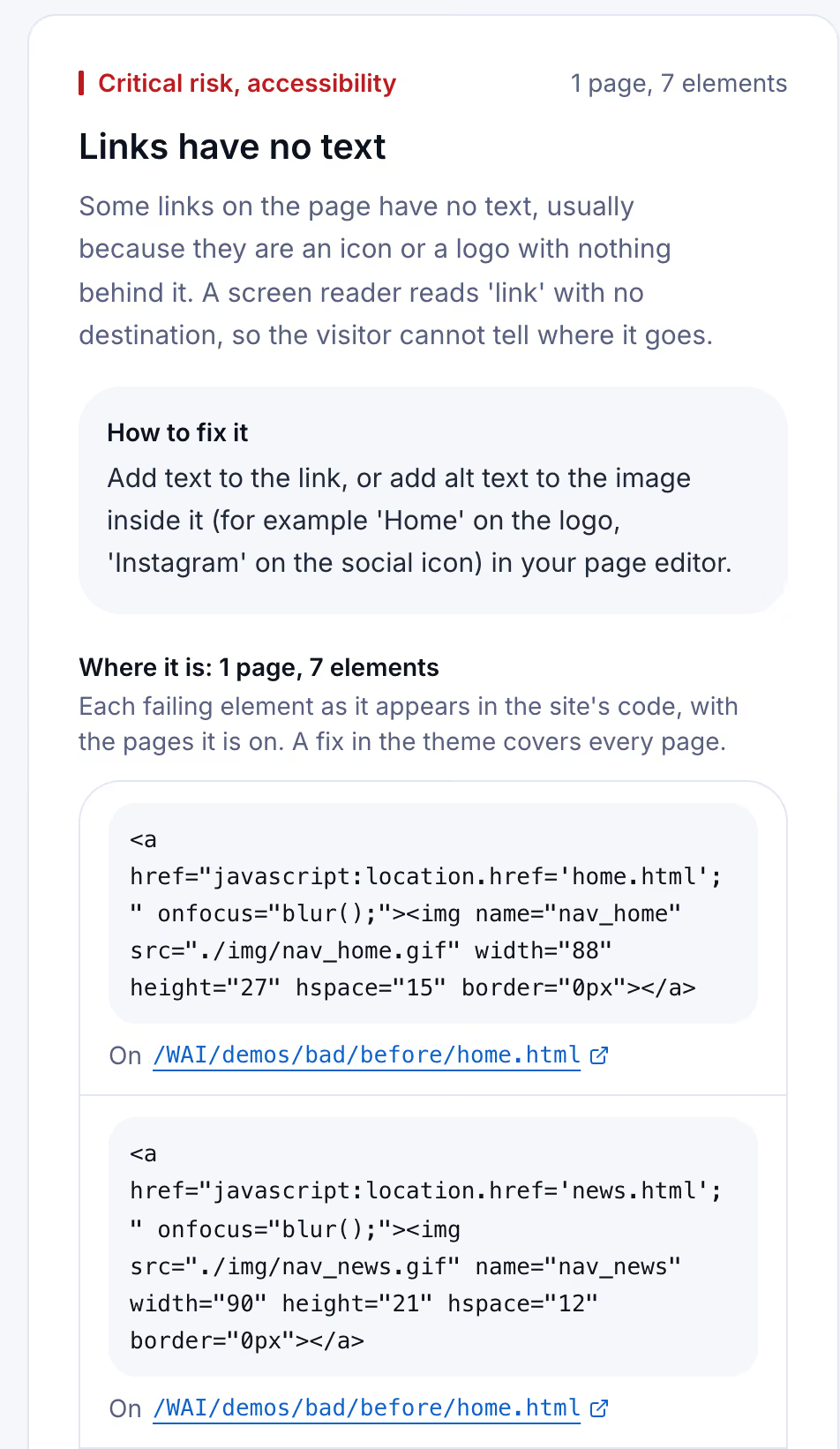
The page in the capture is the W3C's "before" demonstration site, built with accessibility failures on purpose. Its navigation is made of images inside links with no alt text, and the scan found seven links with no text on its home page, so a screen reader announces each one as a bare link.
What a scan cannot do matters as much. The Justice Department's guidance says automated checkers "need to be used carefully" and that "a 'clean' report does not necessarily mean everything is accessible." A scan cannot tell whether alt text describes the image, whether the reading order makes sense, or whether a checkout works by keyboard. That is what the manual check above is for.
Widgets, audits and scans compared
Owners who look for a quick answer meet accessibility widgets, also called overlays: a script that adds a toolbar and promises to adjust the page. The Federal Trade Commission approved a final order on April 22, 2025 requiring the widget maker accessiBe to pay $1 million. The FTC's complaint alleged that accessiBe's claim that its accessWidget plug-in could make any website meet WCAG was false, misleading or unsubstantiated. The Justice Department's guidance calls checkers and overlays "helpful tools" that "need to be used carefully." The accessibility widgets guide sets out what each source says.
The choice is not either or. Each approach answers a different question:
| Approach | What it does | What it finds | What it leaves open |
|---|---|---|---|
| Manual check | You test with a keyboard, a screen reader and zoom | Keyboard traps, meaningless alt text, broken order | Pages you did not test, and changes after the test |
| Free automated scan | Tests five public pages against coded rules | Missing alt text, empty links and buttons, unlabeled fields, low contrast | Anything code cannot judge; pages beyond the five |
| Weekly monitoring | Re-scans up to 100 pages every week | New failures, with the date they appeared | The same limits as any automated check |
| Accessibility widget | Adds a script that changes the page in the visitor's browser after it loads | It is not a check, so it reports nothing to fix | The site's own code, which stays as it was |
| Expert audit | A specialist tests the site by hand and with tools | The most complete picture, including judgment calls | Changes made after the audit date |
Read the table from the top. A manual check plus a free scan covers the failures complaints cite most often, at no cost. An expert audit is worth its price before a redesign or after a letter. Weekly monitoring keeps the result from going stale, which is where most sites slip.
Keeping a site accessible after you fix it
A site that passes today fails next month for ordinary reasons. A new product photo goes up without alt text, an app adds a pop-up with an unlabeled close button, a theme update changes the button colors. The failure arrives with the change, and nobody checks the page again.
That is the case for a scheduled check. Suitcast's Monitor plan re-scans one site's public pages, up to 100 pages, every week, and emails what changed: failures that are new, failures that are gone, and new lawsuits filed over the same issues. It costs $39 a month or $390 a year, with every report kept and a PDF for each. Marking an issue fixed shows whether the next scan agrees.
Three owners it fits:
- A dental practice on WordPress that adds a blog post a week, where a missing alt text on a new image is the most likely failure.
- A Shopify store that uploads products every week and installs apps that inject pop-ups and chat buttons.
- An agency with client sites (how agencies check them), where the Pro plan covers five sites for $79 a month or $790 a year and puts the agency name on each PDF.
Compare the cost with the time a demand letter takes, not with a settlement nobody can predict. The pricing page has both plans side by side.
Limitations
An automated check finds only failures code can detect. It cannot hear whether alt text is meaningful, cannot judge reading order, and cannot complete a checkout for you. The free scan reads 5 pages, so a failure on page six is not in its report. A clean result is not a finding that a site meets the ADA or WCAG.
The lawsuit counts are verified federal filings plus sourced state filings, so they are a floor: letters that never became a lawsuit are not counted, and state-court coverage is partial. The methodology page states every rule, and the data page states the coverage next to each number. The WebAIM figures describe home pages of popular sites, not small business sites in particular.
Nothing here is legal advice. If a letter has already arrived, read the ADA website lawsuit letter guide and talk to a lawyer before replying. The not legal advice page says what a score and a count mean.
Suitcast identifies risk indicators. It is not legal advice and does not determine compliance.
Last updated September 16, 2026.