
Shopify does not show its cookie banner to US visitors by default. Its automated privacy settings configure the banner for the UK and the EEA only. Turn it on for the United States in Settings, Customer privacy, Cookie banner, then check which pixels still fire before a visitor chooses, because the banner governs Shopify's own tools first.
What Shopify's cookie banner covers
Shopify's cookie banner is a notice on the storefront that asks a visitor whether non-essential cookies and tracking may be used. The Shopify help center says it "may be displayed on storefront, cart, and checkout and customer account pages to visitors in configured regions".
What it governs is narrower than most owners assume. Shopify's help center states that the banner "governs Shopify-specific tools, including cookies and Shopify Pixels", and that if you "have manually installed third-party cookies or pixels or integrated them through apps on your store, then you may need to use a third-party cookie banner or add custom logic to ensure they are honoring customer consent".
That sentence is the whole problem in one line. A store can switch the banner on, see it appear, and still send data to Meta and TikTok before anyone clicks, because those pixels were pasted into the theme rather than connected to the banner. The TikTok Pixel guide shows how to hold a pasted TikTok pixel.
The scripts involved are ordinary marketing tools. On Suitcast's trackers page, in the 12 months to September 18, 2026, Meta Pixel is named in 140 verified website tracking complaints, TikTok Pixel in 117 and Google Analytics 4 in 163.
Why US visitors see no banner by default
Shopify sets the banner up for two regions and leaves the rest alone. Its help center says that when you set up a new store, "automated privacy settings are activated by default, which means we will automatically configure your cookie banner for visitors in the UK and EEA regions, if you have active markets in these regions".
For everywhere else the documentation is explicit: "Outside of UK, EEA, and other configured cookie banner regions: The cookie banner will not be active in these regions by default. This is intended for use in regions that don't require opt-in consent for cookies-based data collection, such as in the US. However, you can choose to use the cookie banner in any region."
The same default runs deeper than the banner. Shopify's Customer Privacy API documentation says that "for regions that are configured to require consent, non-essential purposes are not allowed by default until consent is given. For other regions, the default behavior is to allow all processing purposes." An app that follows that API waits for a visitor in Berlin and does not wait for a visitor in Sacramento.
This is a reasonable reading of the law as it stands, and no US federal statute requires a banner. It is also why a California visitor to a Shopify store often meets every pixel on the site before seeing any choice, which is the sequence website tracking complaints describe.
How to turn the banner on for the United States
The region list is a setting, not a plan feature. These steps follow Shopify's own documentation.
- From your Shopify admin, go to Settings, then Customer privacy.
- Click Cookie banner.
- In the Regions and content section, choose manual region customization. Click Edit in the Regions section, select the regions where the banner should display, click Done, then click Save. Leaving Use automated settings on keeps Shopify's recommendations, which today means the UK and the EEA.
- Adjust the appearance so the banner matches the store, then Save.
- Choose the position in the Position section, then Save. Click View to preview the banner on the storefront.
- Check that a reject path exists. A banner with only an accept button records no refusal, which is worth less than nothing in a dispute about consent.
Then open the store in a private window from a US connection and confirm the banner appears. A store with no active US market may need that market enabled before the region can be selected.
What still fires after the banner is on
Turning the banner on changes what Shopify's own tools do. It does not reach a pixel that was pasted into theme.liquid, added by an app that ignores the Customer Privacy API, or placed in Google Tag Manager without a consent requirement.
Suitcast's free scan records exactly this sequence on up to 5 pages of a store's public pages. It logs every request from the moment a page starts loading until the network goes quiet or 8 seconds pass, without clicking anything, matches each request against the 43 scripts in its catalog, then looks for a consent banner, presses reject when one is offered, never accept, and watches 3 more seconds.
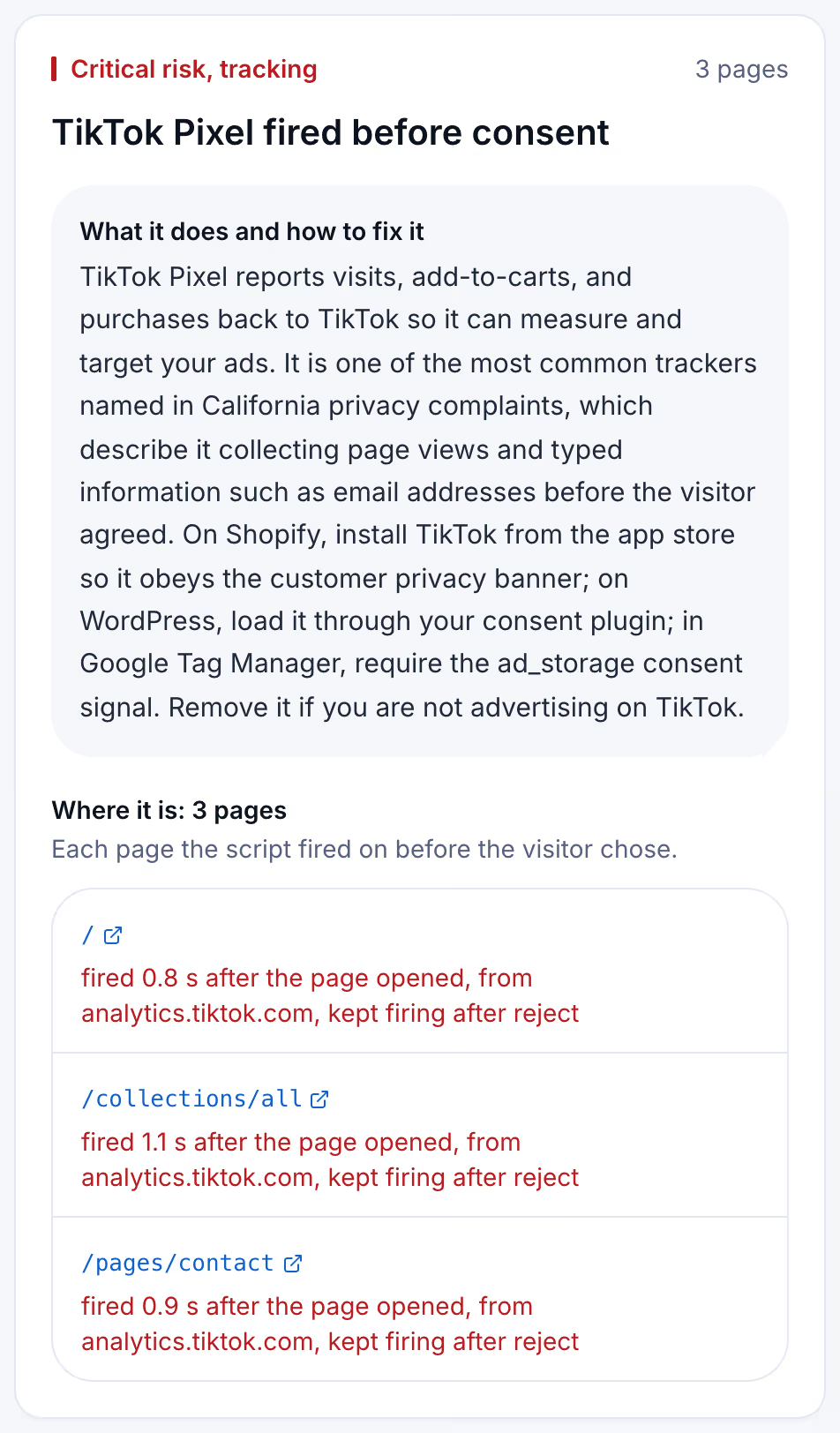
The timing is the part that matters. A complaint under section 631(a) of the California Invasion of Privacy Act, CIPA, describes a script reading a visitor's communication without the consent of all parties. A request logged 0.8 seconds after the page opened, with the banner still on screen, is the fact such a complaint is built on. Section 637.2 lets an injured person sue for $5,000 per violation or three times actual damages, whichever is greater.
Shopify setups compared
Most stores sit in one of four rows. The test in the cookie banner guide tells you which.
| Setup | What a US visitor sees | What fires before a choice | What to change |
|---|---|---|---|
| Default new store | No banner | Every script on the page | Add the US to the banner's regions |
| Banner on, pixels in theme code | Accept and reject | The pasted pixels, immediately | Move each pixel into an app or a consent tool |
| Banner on, apps using the Customer Privacy API | Accept and reject | Only what needs no consent | Confirm each app is integrated, not pasted |
| Banner on, Google advanced consent mode | Accept and reject | Google tags, sending data without cookies | Switch to basic consent mode if no request should go first |
Read the table by where your pixels live, not by whether a banner is visible. The banner is the part a visitor sees; the pixel's installation method decides what the network log shows.
Keeping the banner working as the store changes
A Shopify store changes more often than a brochure site. A new app, a new ad campaign, a theme update that restores an old snippet, an agency adding a tag: each can add a script that sits outside the banner, and nobody reopens the network panel afterwards.
Suitcast's Monitor plan repeats the same scan on up to 100 pages of one store every week and emails what changed: scripts that are new, scripts that are gone, fixes that did not hold, and new filings over the same issues. It costs $39 a month or $390 a year, and every dated report is kept with its PDF. One hour of a privacy lawyer's time costs more than a year of it.
A Shopify store running Meta and TikTok ads is the case this fits best, because app and pixel changes are constant. An agency running 5 to 30 client stores uses Pro, which covers five sites for $79 a month or $790 a year with the agency name on each PDF. The pricing page compares them.
Limitations
This article describes Shopify's documented default as of September 18, 2026. Shopify changes its privacy settings, so check the help center page linked above before relying on a step, and read what your own admin shows.
The scan sees only what a browser sees. Server-side tracking, where a store forwards data from its own server, sends nothing observable in a network panel. The catalog covers 43 scripts, so a tracker it does not recognize is not named, and the free scan reads 5 pages pages.
The complaint counts come from the text of verified filings and are floors: demand letters that never became lawsuits are not counted, and state-court coverage is partial, as the methodology page explains. Whether a particular request violates CIPA is for courts to decide, and California's SB 690, approved by the Governor on September 30, 2026, leaves section 638.51 website claims to the Attorney General from January 1, 2027 and does not change section 631, as the SB 690 guide explains. Nothing here is legal advice, and a banner shown in every region does not determine anything about a claim. The not legal advice page says what a score and a count mean, and the scanner policy describes what the scan loads.
Suitcast identifies risk indicators. It is not legal advice and does not determine compliance.
Last updated October 1, 2026.