
A live chat widget keeps what a visitor types and stores it with the chat vendor. Complaints under the California Invasion of Privacy Act, CIPA, describe that as recording a conversation without telling the visitor first. Suitcast's scanner recognizes six chat widgets and rates every one of them high risk; three verified complaints in the 12 months to September 23, 2026 name one.
What a chat widget records, according to its own documentation
Start with the vendors, because they describe their products more precisely than any summary. Salesloft's wiretapping FAQ for Drift, last updated December 11, 2023, says that "the Customer's instance of the Drift Platform maintains a transcript of the chat which is then stored in the Customer's Drift account and, as such, is recorded".
Zendesk says the same thing in the words it puts in front of the visitor. Its documentation on legal terms in web-based widgets, edited May 2, 2026, describes a privacy notice setting that places the sentence "This chat is recorded using a cloud service." at the top of the messaging widget, with an optional link to the business's own privacy notice.
The widget also identifies the visitor between visits. Intercom's Messenger cookie documentation, written August 10, 2026, lists three first-party cookies: an anonymous visitor identifier, a session identifier that gives the visitor access to previous conversations, and a device identifier refreshed on every ping. Tidio's help center states that cookies are not used under normal conditions because most widget data is stored in the browser's local storage instead.
Those two sentences together are the part owners miss. A consent banner that blocks cookies does not stop a script that writes to local storage and posts a transcript to a vendor. Suitcast's free scan records when each chat script loaded, from which host, and whether it kept loading after the banner's reject button was clicked.
The CIPA sections a chat claim is built on
CIPA is chapter 1.5 of the California Penal Code, enacted in 1967. Three sections carry the website arguments, and they cover different things.
Section 631(a) reaches a person who "willfully and without the consent of all parties to the communication" reads or attempts to learn the contents of any message or communication "while the same is in transit" over a wire, line or cable, or who uses information so obtained. Tidio's own help center tells its customers that the current wave of chat lawsuits is filed under this section.
Section 632(a) covers a person who intentionally and without the consent of all parties uses an electronic recording device to eavesdrop upon or record a "confidential communication". Subdivision (c) defines that term as a communication carried on in circumstances that reasonably indicate a party wants it confined to the parties, and excludes one where the parties may reasonably expect it to be overheard or recorded. A notice at the top of the chat window speaks to that definition.
Section 632.7(a) is narrower than its reputation. It covers a communication "transmitted between two cellular radio telephones, a cellular radio telephone and a landline telephone, two cordless telephones, a cordless telephone and a landline telephone, or a cordless telephone and a cellular radio telephone". Subdivision (d) defines those terms as telephones authorized by the Federal Communications Commission to operate in particular frequency bands, and says "communication" includes voice, data or image, including facsimile. The section was last amended by Senate Bill 1272, effective January 1, 2023. All three sections were read on leginfo.legislature.ca.gov on September 23, 2026.
The price sits in section 637.2: the greater of five thousand dollars per violation or three times actual damages, plus an injunction, and subdivision (c) says the plaintiff need not have suffered actual damages. That is the arithmetic behind a class action over a widget that loads for every visitor.
Where chat widgets sit in the filings on record
Chat widgets are rated high risk for what they record, not for how often they appear in complaints. On Suitcast's tracker catalog, the scanner recognizes 43 scripts, 12 of them critical, 18 high and 13 medium, and 32 are named in verified complaints from the last 12 months. Chat widgets are six of the 43, all high.
The counts, in the 12 months to September 23, 2026, are small: Zendesk Chat is named in 3 complaints, while Intercom Messenger, Drift, Tidio, LiveChat and Gorgias Chat are named in none. Advertising pixels dominate the same list: Google Analytics 4 with 164 complaints, the Google Ads tag with 160, Meta Pixel with 141.
So the honest framing is this. If you are deciding what to fix first, the pixels on your checkout pages are named in far more filings, and the tracker guide ranks them. The reason a chat widget still deserves attention is the content it holds: a transcript of a conversation, sometimes with a name, an email address or an order number in it, held by a third party. Nationally, Suitcast's dataset holds 411 website tracking filings over those 12 months, most of them attributed to California.
How to hold each widget until the visitor chooses
Every vendor here ships either a way to delay the script or a notice to show inside the window. The settings below come from each vendor's own documentation, read on September 23, 2026.
| Widget | What its documentation says | How to hold or disclose it | Where the setting lives |
|---|---|---|---|
| Intercom Messenger | Three first-party cookies identify visitor, session and device | With consent required and not granted, Intercom loads but does not boot and sets no cookies | disabled: true in the settings object, then boot on accept |
| Drift | The instance keeps a transcript, stored in the account, and is recorded | A persistent footer with consent text, or the consent feature | Settings, then Data Privacy, then Consent Forms |
| LiveChat | The widget can be initialized on demand | Asynchronous initialization holds the widget until your code calls it | asyncInit in the snippet, then init after the banner's accept |
| Zendesk Chat | A privacy notice states the chat is recorded using a cloud service | Show the notice, or use a cookie banner that hides the widget until it is acknowledged | Admin Center, Channels, Messaging, the widget's Basics tab |
| Tidio | Cookies are not used under normal conditions; data sits in local storage | An opt-in step before the chat starts, through the pre-chat survey or a workflow decision node | The widget's pre-chat survey, or the workflow editor |
| Gorgias Chat | A privacy disclosure can open the conversation | Show a disclosure with your own text and links at the start of a chat | Settings, Channels, Chat, the Appearance tab, Privacy policy |
Read the table by how your site is built. Intercom and LiveChat can be held back in code, so a developer wires them to your banner's accept. Zendesk, Gorgias and Drift are configured in the vendor's own admin, which an owner can do alone. Tidio's route is a step in the conversation rather than a delay on the script. Whichever you choose, the same rule from the cookie banner guide applies: a banner is worth nothing until the scripts actually wait for it.
How to check what your chat widget does today
Do this in order, on a page a customer would land on:
- Open the page in a private window with the browser's network panel recording, and filter for the vendor's host, such as
widget.intercom.ioorcode.tidio.co. - Watch whether the widget's script loads before you touch the banner. Note the time it appears.
- Click reject, reload, and look again. A widget that still loads is not waiting for the choice.
- Open the chat and read what the window says at the top, if anything.
- Fix it where the setting lives, using the table above, then repeat steps 1 to 3.
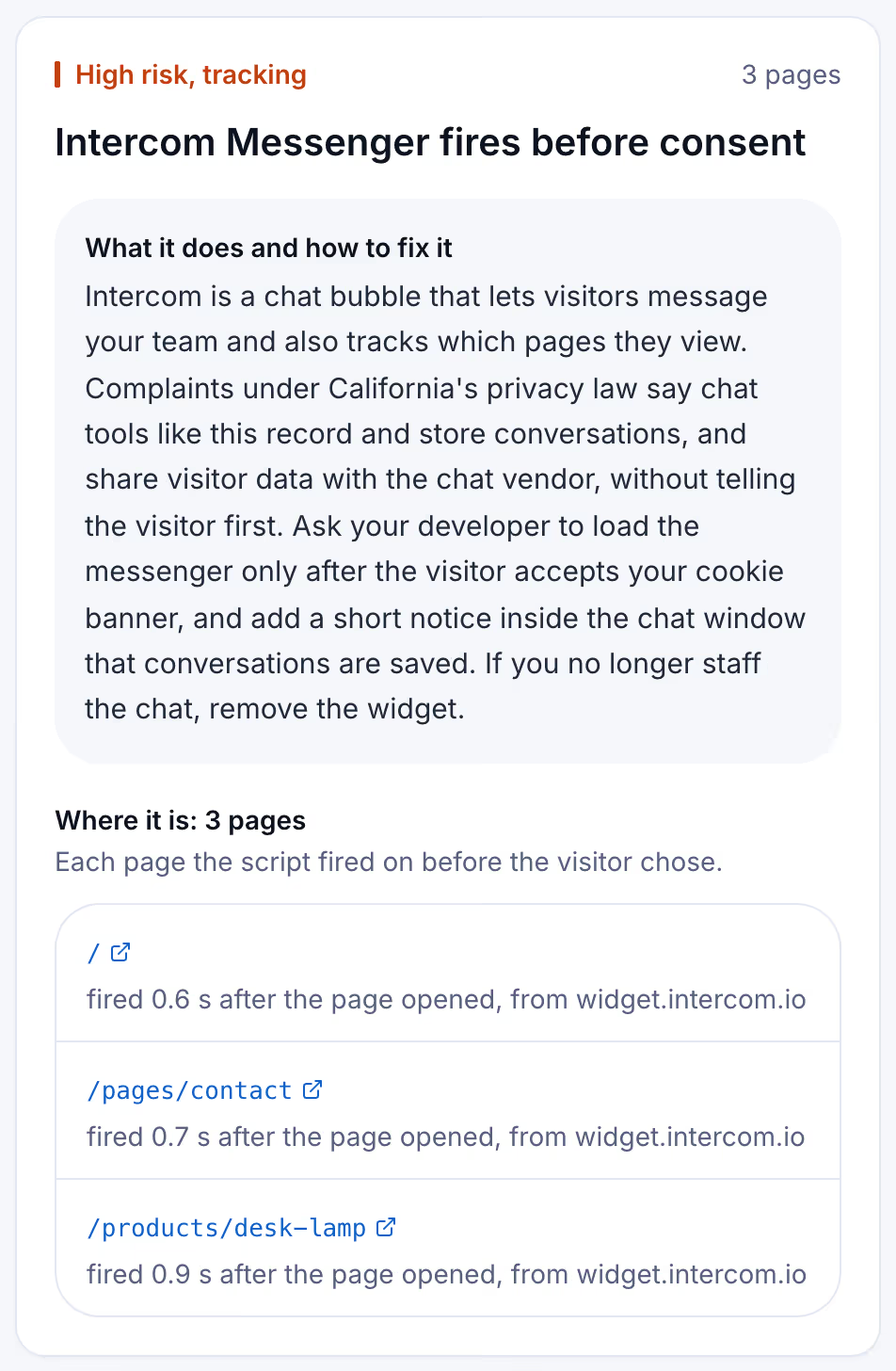
A scan does the same thing across pages instead of one. The card below is a finding from a Suitcast report on a reserved example address: a chat widget that loaded before any consent choice, with the pages it loaded on and the host it came from.
Keeping it that way after the next app install
A chat widget is usually installed as an app or a theme snippet, which means it comes back. A new support tool, a marketing app on Shopify, or a developer restoring an old snippet puts the script back on the page without the delay you added. That is the failure worth catching, because nobody on the team sees it happen.
A free scan is one dated snapshot of 5 pages. Suitcast's Monitor plan scans up to 100 pages every week, keeps every report with its PDF, and sends a weekly email naming what changed on the site and which new filings match it by state, industry or script. It costs $39 a month or $390 a year, against one hour of a privacy lawyer's time. A Shopify store running a support chat and Meta ads, or a clinic whose agency installs tags, gets the same check every week without asking anyone. An agency with client sites covers five on Pro for $79 a month or $790 a year, with its own name on each PDF. The pricing page compares the plans.
Limitations
This guide quotes California Penal Code sections 631, 632, 632.7 and 637.2 as published on leginfo.legislature.ca.gov and read on September 23, 2026, and each vendor's own documentation as read the same day. Vendors change settings and documentation without notice, and which section reaches a browser chat is a question courts answer case by case, not one this guide settles. Nothing here is legal advice, and the not legal advice page says what a score and a count mean.
A scan records what a browser can see from outside: which scripts loaded, when, from which host, and whether they kept loading after a reject. It cannot read the chat vendor's servers, tell you what the transcript holds, or judge whether a notice is enough. The counts here are verified federal filings plus state filings with a public source, and state-court coverage is partial, as the methodology page explains, so a script named in no complaint is not a script nobody has sued over.
Suitcast identifies risk indicators. It is not legal advice and does not determine compliance.
Last updated September 23, 2026.