
An accessibility widget, also called an overlay, is a script that adds a toolbar to a website and changes the page in the visitor's browser. It does not change the site's own code, which is what an ADA website complaint describes. In 2025 the Federal Trade Commission ordered the widget maker accessiBe to pay $1 million, and the Justice Department says automated tools need to be used carefully.
What an accessibility widget is
An accessibility widget is a piece of JavaScript a site owner adds with one line of code or a platform app. When a page loads, the script adds a button, usually a round icon in a corner, that opens a menu of display settings: larger text, higher contrast, a readable font, paused animations. Some widgets also try to repair the page automatically, for example by generating descriptions for images or adding names to buttons as the page loads.
A dental practice on WordPress might meet one in a vendor's email after a nearby practice receives a demand letter. A Shopify store might find one among the accessibility apps in the app store. Either way the offer is a script to install rather than changes to make.
The distinction that matters is where the change happens. A widget changes what one visitor's browser shows, after the page arrives. The theme, the page editor content and the HTML the server sends stay exactly as they were. A button with no text in the theme is still a button with no text in the theme, whatever the script does on top of it.
That is also where complaints look. The Americans with Disabilities Act, ADA, website complaints filed in federal court describe specific failures in a site's pages, such as images with no description, links with no text and pages with no title. Suitcast counts 849 verified website accessibility filings in the 12 months to September 21, 2026 on its dataset page, and the firm pages list what each plaintiff firm's complaints cite.
What the FTC found about accessiBe
The main public record on widgets comes from the Federal Trade Commission. On January 3, 2025, the FTC announced a proposed order requiring accessiBe, the maker of the accessWidget plug-in, to pay $1 million. The FTC's complaint said accessiBe claimed its AI tool could make any website meet the Web Content Accessibility Guidelines, WCAG, and that the tool did not do that for all the sites that used it.
The same complaint said accessiBe formatted third-party articles and reviews to look like independent opinions, without disclosing its ties to the reviewers. That detail matters to an owner who researched widgets by reading comparison articles.
On April 22, 2025, the Commission approved the final order by a 3-0 vote. The order bars accessiBe from saying its automated products can make any website meet WCAG, or keep it meeting WCAG over time, unless it has evidence to support the claim. It also bars the company from presenting paid reviews or endorsers as independent.
The order is about one company's advertising, not a ruling on every widget. It does record that a federal agency examined the central promise of the category, that a script can bring any site up to the guidelines, and found that promise unsupported for this product.
What the Justice Department and W3C say about automated tools
The Justice Department's guidance on web accessibility and the ADA, dated March 18, 2022, names overlays directly. It says "automated accessibility checkers and overlays that identify or fix problems with your website can be helpful tools", but that like spelling or grammar checkers "they need to be used carefully", and that a "clean" report does not necessarily mean everything is accessible. It recommends pairing a manual check with automated checkers.
The W3C's Web Accessibility Initiative, which publishes WCAG, makes the same point about testing tools on its page on selecting evaluation tools: tools cannot check all accessibility aspects automatically, human judgement is required, and evaluation tools "can not determine accessibility, they can only assist in doing so".
People who do this work agree. In WebAIM's Survey of Web Accessibility Practitioners #3, run in January 2021 with 758 valid responses, 67% rated overlays, plugins or widgets that automate accessibility changes as not very or not at all effective. Among respondents with disabilities the figure was 72%, and 2.4% rated them very effective.
Read together, the sources draw one line. Automated tools, whether they report problems or try to patch them, help a person find work to do. None of them replaces fixing the site.
What ADA website complaints cite
ADA website complaints name failures a visitor using a screen reader or a keyboard runs into, and they name them in the site's own terms. Suitcast's firm pages show what each firm's verified complaints cite most. On September 21, 2026, the page for Equal Access Law Group, the firm on the most dockets in the 12 months to that date with 266, listed clickable items that are not real links or buttons, images with no description, and elements presented as images with no description.
Every one of those lives in the theme or the page content. An image with no alt text is fixed in the media library or the image block, as the alt text guide shows for Shopify, WordPress, Squarespace and Wix. A clickable element built from a plain box instead of a link or a button is fixed in the theme's code. A form field with no label is fixed in the form builder.
Suitcast's free scan loads your public pages in a real browser, with every script that runs on them, the widget included, and runs the 44 automated checks behind what complaints cite after the page has settled. It reports what still fails, as the page's HTML, with the pages it is on.
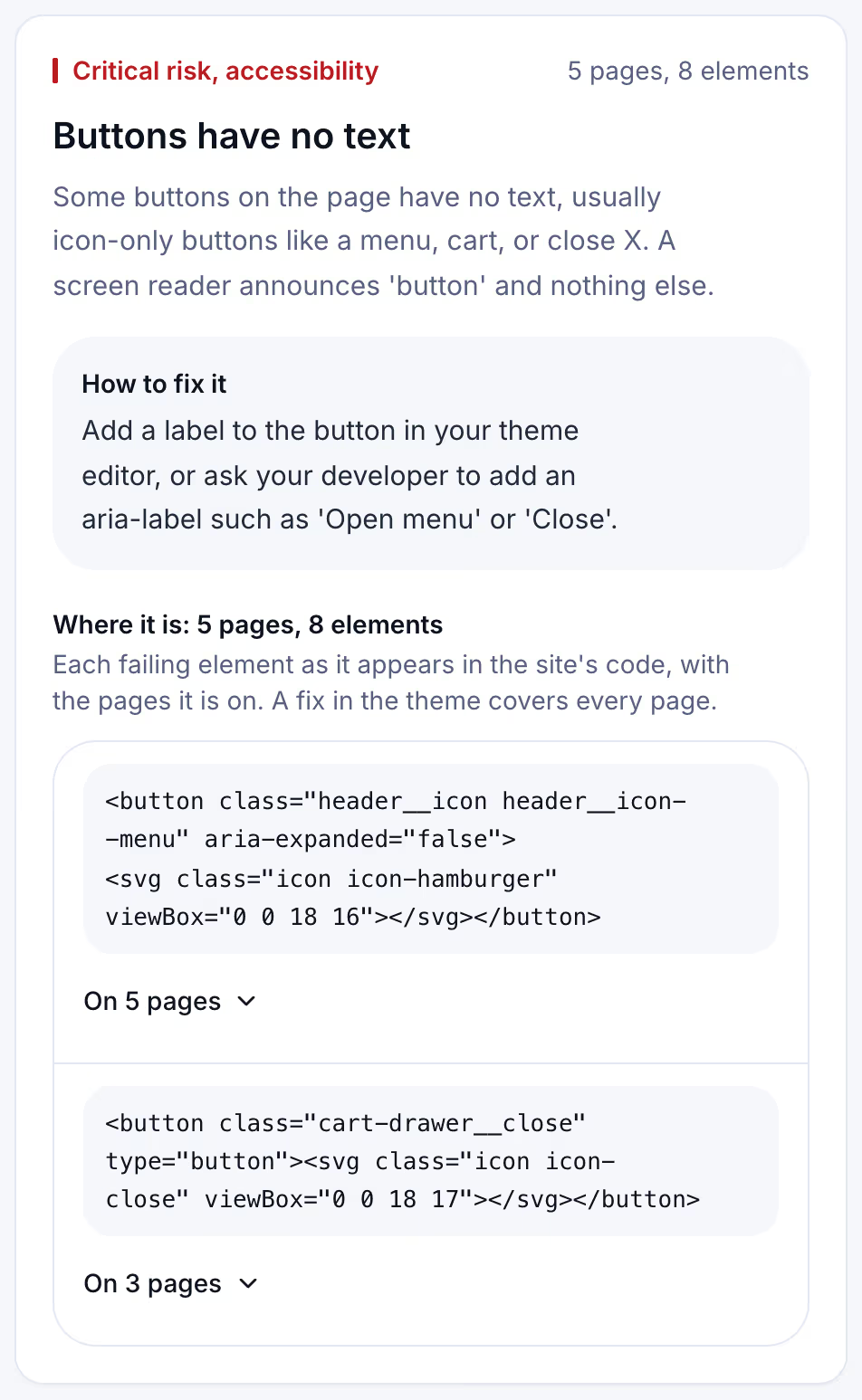
The card shows why a theme fix beats a patch. The menu button fails on all five pages because it is one piece of the theme header. Adding a label to that one button in the theme fixes every page at once, for every visitor, with or without any script.
Widget, scan, fixes and audit compared
The options owners weigh do different jobs. The table sets them side by side.
| Option | What it changes | What it tells you | What it leaves |
|---|---|---|---|
| Accessibility widget | Adds display settings and runtime patches in the visitor's browser | Nothing to fix; it is not a report | The site's own code, as it was |
| Automated scan | Nothing; it reads the page | The failures code can measure, with the HTML and the pages | What needs a person: keyboard use, meaningful descriptions |
| Fixes in the theme and content | The site itself, for every visitor | Nothing on its own; it acts on a list | Whatever no one has found yet |
| Manual audit with a screen reader | Nothing; it reviews the site against WCAG | The full list, including what tools miss | The fixes, which someone still has to make |
Read it as a sequence rather than a menu. A scan or an audit produces the list, the fixes act on it, and a widget sits beside all three as a display preference some visitors may use. Only the third row changes what a complaint would describe.
What to fix first, and keeping it fixed
Start with the failures complaints name most, because they are also the ones that block most visitors.
- Paste your address into the free scan and read the accessibility findings, most serious first.
- Fix site-wide parts once: the header menu button, the logo link, the cart icon, the footer social links. They fail on every page, so one theme change clears many findings.
- Add descriptions to images in the page editor, and mark purely decorative images as decorative.
- Label every form field in the form builder, with a visible label rather than placeholder text alone.
- Scan again and confirm the count went down.
Then the site changes. A new app adds a chat button with no name, a theme update restores an old icon link, a new product page arrives with twelve images and no descriptions. Suitcast's Monitor plan repeats the scan on up to 100 pages of one site every week and emails what changed: new failures, fixes that did not hold, and new filings in your state. It costs $39 a month or $390 a year, less than one hour of a lawyer's time, and keeps every dated report with its PDF. The free scan covers 5 pages with no history.
An agency with 5 to 30 client sites uses Pro, five sites for $79 a month or $790 a year with the agency name on each PDF. The pricing page compares the plans.
Limitations
This article describes the FTC order, the Justice Department guidance and the W3C page as each read on September 21, 2026. The FTC order concerns one company's claims and is not a finding about every widget. The WebAIM figures come from a 2021 survey of accessibility practitioners, not of all people with disabilities.
An automated scan finds only what code can measure, and W3C says no tool can determine accessibility by itself. Suitcast's scan runs 44 automated checks on public pages; it does not test keyboard flow by hand, judge whether a description is meaningful, or read PDFs and videos. A clean result is not a statement that a site is accessible.
The lawsuit counts are floors. They come from verified federal dockets plus curated state filings, demand letters are not counted, and state-court coverage is partial, as the methodology page explains; the California and New York pages show where most are filed. Nothing here is legal advice, and no tool or fix prevents a claim. The not legal advice page explains what the numbers mean, and the scanner policy describes what the scan loads.
Suitcast identifies risk indicators. It is not legal advice and does not determine compliance.
Last updated September 21, 2026.