
To add alt text, open the image's settings where you manage it: Products or Content, then Files in Shopify; the Image block or the Media Library in WordPress; the image block, gallery or product image in Squarespace; the image Settings panel or the Accessibility Wizard in Wix. Describe what the image shows for this page. Give decorative images an empty description, never none.
What alt text is and why complaints cite it
Alt text is the short description a screen reader speaks in place of an image. The Web Content Accessibility Guidelines, WCAG, make it the first success criterion, 1.1.1 Non-text Content: "All non-text content that is presented to the user has a text alternative that serves the equivalent purpose," with a few exceptions such as decoration. Without it, a blind visitor using a screen reader hears "image" and nothing more.
Website accessibility complaints under Title III of the Americans with Disabilities Act, ADA, list this failure again and again. Suitcast counts 853 verified website accessibility filings in the 12 months to September 19, 2026, on its dataset page. The firm pages show what the busiest filers' complaints cite, read from the complaint text:
- Equal Access Law Group, named on 266 dockets in those 12 months, cites images with no description in 261 complaints.
- Gottlieb & Associates, named on 147, cites it in 135 complaints.
- Joseph & Norinsberg, named on 65, cites it in 54 complaints, more than any other failure.
It is also the easiest failure to create. The WebAIM Million 2026 report counted 66.6 images on the average top home page and found 16.2% of them, about 10.8 per page, with no alt text at all. 45% of those were images inside links, so the link itself had no name. Every new product photo, blog image or banner is a new chance to leave the field empty, which is why this is the failure to fix first and check most often.
How to add alt text in Shopify
Shopify keeps alt text on the file, so the place to add it depends on where the image lives. Shopify's help center gives these steps for product images:
- From the Shopify admin, go to Products and click the product.
- Click a product image to open the Preview media page.
- Click Add alt text, type the description, and click Save alt text.
Shopify allows 512 characters and recommends 125 or less. Its media editor may suggest alt text where the field is empty, and accepting the suggestion saves it to the file, so read it before you accept it.
Images you upload in the theme editor, such as a hero banner or a collection image, appear under Content, then Files. There, each image has an Add alt text action, and the file list can be filtered by alt text, which is the fastest way to see every image in the store that still has none. Start with the images used on the home page and on your best-selling products, because those are the pages most visitors see first.
A Shopify store adds images every week, and apps add their own: a review widget's star icons, a chat button, a pop-up. Those come from the app's code rather than your files, so their descriptions have to be fixed in the app's settings or by its developer. The Shopify cookie banner guide covers the other setting Shopify stores most often miss.
How to add alt text in WordPress
WordPress has two places for alt text, and they do different things. The WordPress.org documentation for the Image block says that alt text added in the block settings "only applies to the image on that specific page or post", while alt text added in the Media Library "sets the default alt text when you insert the image elsewhere".
That difference catches most WordPress sites. Filling in the Media Library fixes the next post that uses the image, not the posts where it is already placed. To fix an existing post:
- Open the post or page in the block editor and select the image.
- In the block settings sidebar, find Alternative text and describe the image.
- If the image is purely decorative, choose Mark as decorative instead, so assistive technology skips it.
- Update the post, then repeat for the other images on it.
For images you will reuse, such as a team photo or a logo, fill in the Media Library too, so every future post starts with a description. Check the header logo and other theme images once after every theme update.
A dental practice on WordPress that publishes a post a week should make the alt text field part of publishing, the same as the title. It is the most likely failure on a site that adds a new image every week.
How to add alt text in Squarespace and Wix
Squarespace fills in some descriptions for you, and not always helpfully. Squarespace's help center says that in some places the image's file name serves as the alt text when none is added, and page featured images always use the file name. An image called IMG_4032.jpg is read out as that. WebAIM found 10.8% of images that did have alt text used a file name or a word like "image" instead of a description.
- Image blocks: in the block editor, open the Content tab and fill in Image alt text, up to 250 characters. An image block with no alt text is hidden from screen readers.
- Product images: open the product, click the three dots on the image, choose Edit metadata and fill in Alt text, up to 200 characters. Without it, the product name is used.
- Blog post featured images use the post title. Section background images cannot take alt text; Squarespace says purely decorative images do not need one.
- The SEO report tool lists images without alt text in image blocks, gallery sections and auto layouts. Squarespace says images in collection items are not included in that scan.
Wix's help center puts alt text in the image's Settings panel: click the image, click the Settings icon and fill in What's in the image?. Gallery images are described in Manage Media. The Accessibility Wizard, under Settings, scans the site and lists every image without alt text on each page, where you can add a description or tick This image is decorative. Wix says images that contain links should always have alt text, and that the site must be published before the new alt text is live.
The four platforms compared
The same failure has a different cause on each platform. The table shows where the field is, what happens when it stays empty, and how to list the images that still need one.
| Platform | Where to add it | When it is left empty | Decorative option | Finding the missing ones |
|---|---|---|---|---|
| Shopify | Products, the image, Add alt text; theme images under Content, Files | No alt text saved on the file | Not in the steps Shopify documents | Filter Content, Files by alt text |
| WordPress | Image block settings for that post; Media Library for future posts | No description on that post | Mark as decorative in the block | Open each post; no built-in list |
| Squarespace | Image block Content tab; product Edit metadata | File name, product name or post title; image blocks hidden | None; background images take no alt text | SEO report tool, except collection items |
| Wix | Image Settings, What's in the image? | No description | Tick decorative in the Accessibility Wizard | Accessibility Wizard, Scan Site |
Read the table by the last column. Shopify and Wix can list every image still missing a description, so start there. On WordPress there is no list, so an outside check is the quickest way to find the posts that need work. On Squarespace, check what the defaults actually say, because a file name counts as a description to a checker but not to a person.
How to find every image that still has no description
A platform's own list covers only the images it manages. An outside check reads the page as a visitor's browser receives it, so it also finds images added by apps, themes and embedded widgets.
Suitcast's free scan loads up to 5 pages of your public site in a real browser, runs the 44 accessibility checks in its catalog with the open-source axe-core engine, and lists every image with no description as the page's own HTML, with each page it is on. Images inside links show up as a separate finding, links with no text, because the link has no name either. The scanner policy says what the scan loads and how to block it.
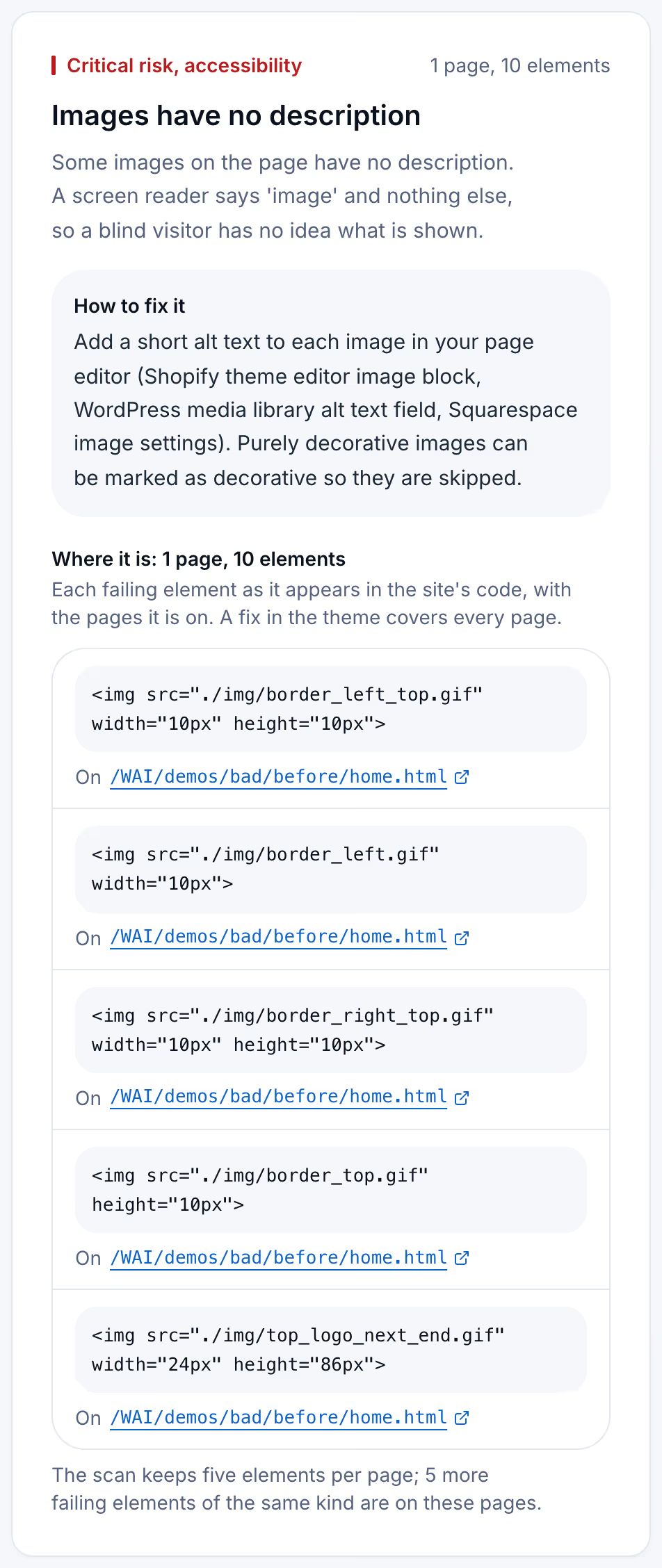
The page in the capture is the W3C's "before" demonstration site, built with failures on purpose. The five images the card shows are corner and border pieces of the page frame: decoration, carrying no meaning. They still fail, because they have no alt attribute at all. The W3C's alt decision tree gives the fix: an image that is purely decorative gets an empty alt attribute, so a screen reader skips it. An image in a link or a button gets alt text that says where the link goes or what the button does.
Keeping alt text in place after you fix it
Alt text breaks the way it was first missed: a new product, a new post, a new banner, a new app. The fix you make today covers the images on the site today, and the next upload starts empty again.
Fix in this order. First the images on the home page, the main service or product pages and the contact page. Then the images inside links, which also count as links with no text. Then the templates, such as a logo or a footer icon, because one fix there covers every page.
Suitcast's Monitor plan re-scans one site, up to 100 pages, every week, and emails what changed: failures that are new, with the date they appeared, failures that are gone, and new lawsuits filed over the same issues. It costs $39 a month or $390 a year, with every report kept and a PDF for each. It suits a Shopify store that uploads products every week, or a dental practice on WordPress that posts a blog article a week. An agency looking after client sites can cover five sites on Pro for $79 a month or $790 a year, with the agency name on each PDF. Compare the price with one hour of a lawyer's time, not with an outcome nobody can predict. The pricing page has both plans side by side.
Limitations
An automated check finds images with no description. It treats an empty description as a decision that the image is decorative, and it cannot tell whether a description is accurate or useful: "red dress" on a photo of a blue sofa passes. Only a person reading the description beside the image can judge that. The free scan reads 5 pages, so images on other pages are not in its report.
The platform steps are taken from each platform's own help center as read on September 19, 2026, and platforms rename menus often. The WebAIM figures describe the home pages of popular sites, not small business sites in particular. The lawsuit counts are verified federal filings plus sourced state filings, so they are a floor; the methodology page states every rule.
Nothing here is legal advice, and fixing alt text alone does not make a site accessible. The check guide covers the other failures complaints cite. If a complaint has already been served, read the guide to the first 21 days and call a lawyer the same day.
Suitcast identifies risk indicators. It is not legal advice and does not determine compliance.
Last updated September 19, 2026.