
Google Analytics 4 loads when the page opens unless something holds it back. Google's consent mode has two versions and they behave differently: basic consent mode blocks Google tags until the visitor interacts with the banner, and advanced consent mode loads them immediately and sends measurements without cookies while consent is denied. Only basic mode sends nothing first.
What Google Analytics 4 sends when a page opens
Google Analytics 4, GA4, is the measurement tag most small business sites run, usually installed through a plugin, a Shopify app or Google Tag Manager. On a page with no consent gating it loads with everything else and reports the page view straight away.
It is also the script that website tracking complaints name most. On Suitcast's trackers page, in the 12 months to September 18, 2026, Google Analytics 4 appears in 163 verified complaints, ahead of the Google Ads conversion tag at 158, Meta Pixel at 140 and TikTok Pixel at 117. Suitcast counts 412 verified website tracking filings in that window on its dataset page.
How GA4 arrives on a site matters more than the tag itself. A WordPress site usually gets it from a plugin that also offers consent settings. A Shopify store gets it from the Google & YouTube app, or from a snippet somebody pasted into the theme years ago. An agency-run site usually gets it from Google Tag Manager, where the tag and the consent rule are two separate pieces of configuration that a single publish can separate.
That matters because the fix is never "turn on GA4 consent". It is finding which of those four paths installed the tag, and setting the rule there. A site can hold the tag in Tag Manager and still send a page view from a forgotten snippet in the theme.
The claim in those filings is about sequence, not about analytics being wrong. Section 631(a) of the California Invasion of Privacy Act, CIPA, covers reading the contents of a communication in transit "without the consent of all parties". Section 637.2 lets an injured person sue for $5,000 per violation or three times actual damages, whichever is greater, and says actual damages are not required.
Basic and advanced consent mode behave differently
Google's consent mode documentation describes two implementations, and the difference decides whether any request reaches Google before a visitor chooses.
Basic consent mode. Google states that it "prevents Google tags from loading until a user interacts with a consent banner" and that "this setup transmits no data to Google prior to user interaction with the consent banner". If the user does not consent, "no data is transferred to Google at all, not even the consent status", and the tags are blocked from firing.
Advanced consent mode. Google states that the tags "load when a user opens the website or app", set default consent states, and that "while consent is denied, the Google tags send measurements without cookies". Full measurement follows only after consent is granted.
Advanced mode is the version most consent platforms install, because Google says it enables better conversion modeling. The cost is that requests go out first. Google's documentation says those pings can include "functional information (such as headers added passively by the browser)" listing the timestamp, user agent and referrer, alongside aggregate non-identifying information.
No cookie is set while consent is denied. A request carrying an address and a referring page still leaves the visitor's browser, which is the fact a complaint describes.
How to hold Google Analytics 4 until consent
Where the setting lives depends on how GA4 was installed. Find the one that matches your site.
- Google Tag Manager. Open the container's consent settings, then set each tag's consent requirement:
analytics_storagefor GA4,ad_storagefor ad pixels, andad_user_dataas well for the Google Ads tag. A tag with no requirement fires regardless of the banner; the Tag Manager consent guide covers the rest of the container. - A consent platform on WordPress. Complianz, CookieYes and similar plugins install consent mode for you. Check which version they installed: the choice between basic and advanced is usually one toggle, often labeled as Google consent mode or advanced mode, and advanced is the common default. The WordPress cookie banner guide shows which of those settings apply to US visitors.
- Shopify. Install GA4 through the Google & YouTube app rather than pasting the tag into
theme.liquid, so it follows the store's customer privacy settings, and turn the banner on for the United States as the Shopify banner guide describes. - A tag pasted into the theme or header. Move it. A hard-coded
gtag.jssnippet answers to nothing, and no banner setting will reach it. - Choose the mode deliberately. If no request should go to Google before a choice, use basic consent mode and accept the weaker modeling. If you keep advanced mode, know that requests to Google appear in the network log before any click.
Then load the site in a private window with the network panel recording and filter for google-analytics and googletagmanager. Rows before your first click are what is left to fix.
What the free scan records about the timing
Suitcast's free scan runs that test on up to 5 pages of your public pages and writes the result down with a date. It records every request from the moment a page starts loading until the network goes quiet or 8 seconds pass, without clicking anything, matches each against the 43 scripts in its catalog, then finds the consent banner, presses reject when one is offered, never accept, and watches 3 more seconds.
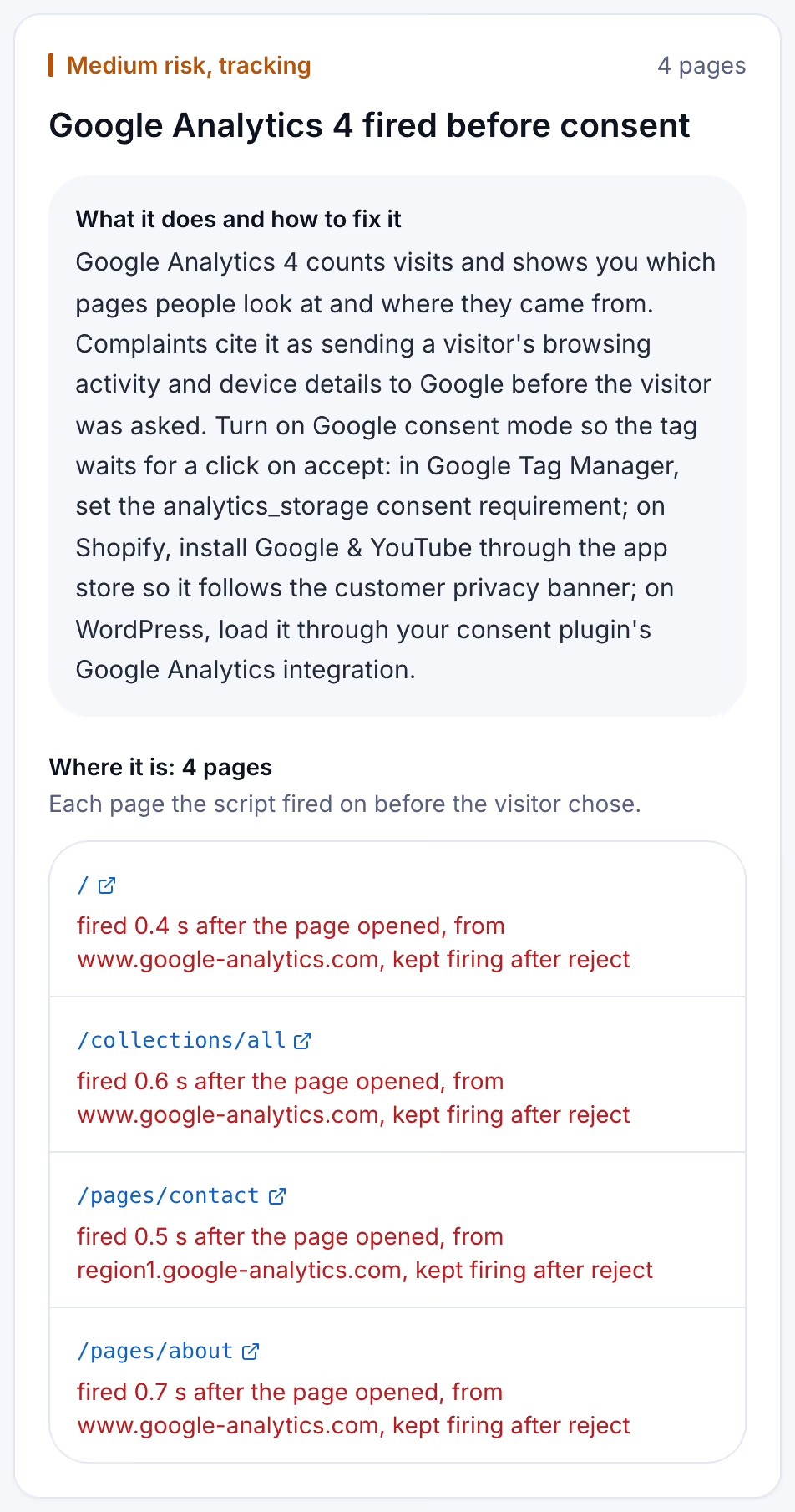
Two numbers on the card do the work. The seconds after the page opened show whether the tag waited. The line about reject shows whether it stopped when a visitor refused, which complaints treat as the stronger allegation, because a refusal that changes nothing is hard to describe as consent.
Consent mode options compared
The rows below are what a network panel shows before the visitor clicks anything.
| Setup | Requests to Google before a choice | Cookies set before a choice | What you give up |
|---|---|---|---|
| No consent mode | Full measurement | Yes, including _ga | Nothing, and nothing is held back |
| Advanced consent mode | Pings without cookies | No | Little measurement, but requests still go |
| Basic consent mode | None | No | Advertiser-specific conversion modeling |
| GA4 removed from the page | None | No | Analytics entirely |
Read it as a trade between measurement and sequence. Basic consent mode is the only row where nothing reaches Google before the visitor decides, and Google's own documentation says so.
Keeping the tag held as the site changes
Consent settings drift. A new plugin adds its own gtag.js, an agency publishes a container change that drops a consent requirement, a theme update restores an old snippet. The tag that waited last month fires first this month, and nothing tells the owner.
Suitcast's Monitor plan repeats the scan on up to 100 pages of one site every week and emails what changed: new scripts, scripts that stopped, fixes that did not hold, and new filings over the same issues. It costs $39 a month or $390 a year, against an hour of privacy counsel that costs more. Every dated report is kept with its PDF, which is the record worth having if a letter arrives.
This fits a clinic or law office on WordPress whose marketing agency owns the tag container, and a Shopify store running Google Ads. An agency with 5 to 30 client sites uses Pro, five sites for $79 a month or $790 a year with the agency name on each PDF; the pricing page compares them.
Limitations
Google changes consent mode, and this article describes its documentation as of September 18, 2026. Read the page linked above before relying on a behavior, and confirm which version your consent platform installed rather than trusting its marketing.
A browser-based scan sees only browser requests. Server-side tagging, where a site sends events from its own server to Google, produces nothing a network panel can observe, and holding a client-side tag does not stop it. The catalog covers 43 scripts, and the free scan reads 5 pages pages.
The complaint counts come from the text of verified filings, so they are floors: demand letters are not counted and state-court coverage is partial, as the methodology page explains. Whether a given request violates CIPA is unsettled and is for courts to decide; California's SB 690, approved by the Governor on September 30, 2026, leaves section 638.51 website claims to the Attorney General from January 1, 2027 and does not change section 631, as the SB 690 guide explains. Nothing here is legal advice, and holding a tag until consent does not determine anything about a claim. The not legal advice page explains what a count means, and the scanner policy describes what the scan loads.
Suitcast identifies risk indicators. It is not legal advice and does not determine compliance.
Last updated October 1, 2026.