
WordPress has no cookie banner of its own, so what holds a tracker is the consent plugin the owner installs and how it is set for US visitors. Site Kit's consent mode sets denied defaults for Europe and the UK only, and the WP Consent API blocks nothing. Suitcast counts 406 website tracking filings under the California Invasion of Privacy Act, CIPA, in the 12 months to September 27, 2026.
WordPress itself has no cookie banner
Self-hosted WordPress, the software from wordpress.org, ships with no cookie banner, no consent setting and no way to hold a script until a visitor chooses. Every script a theme or plugin adds loads on the first page view unless something else stops it.
Adding one to core has been discussed for years. The 2020 feature plugin proposal for the WP Consent API said that "Third-party scripts have to be blocked by a blocking functionality in a consent management plugin", because doing it in core "would be too intrusive". A December 2024 proposal on make.wordpress.org asked again to adopt the WP Consent API into core, and suggested core could also offer a default cookie popup or block. As of September 27, 2026, the API's GitHub repository describes it as "Planned for adoption to WordPress Core", and no cookie banner is part of WordPress.
WordPress.com, the hosted service, has a Cookie Consent block that "displays a cookie consent banner" letting visitors know the site uses cookies. Its support page says the block "does not include a button in the banner to deny or refuse consent", and points owners who want a reject option to a third-party consent plugin. On a site with WordAds, WordPress.com shows its own ad consent banner instead.
So on WordPress, the banner, the blocking and the regions it applies to all come from a plugin. Suitcast's free scan shows what that plugin actually holds: every tracking request before a choice, with the second it fired.
Why this matters for a WordPress site in the US
Website tracking complaints rest on two sections of the California Penal Code. Section 631(a) reaches anyone who, "willfully and without the consent of all parties to the communication", reads or attempts to learn the contents of a communication in transit. Section 638.51 bars installing or using a pen register without a court order, and section 638.50 defines one as a device or process that records routing and addressing information, "but not the contents of a communication". Section 637.2 allows the greater of five thousand dollars per violation or three times actual damages. All four were read on leginfo.legislature.ca.gov on September 27, 2026.
The complaints describe a sequence: a request to an ad or analytics network leaving the browser before the visitor answered the banner. On Suitcast's tracker catalog, in the 12 months to September 27, 2026, the scripts named most are the ones WordPress plugins add most often: Google Analytics 4 in 163 verified complaints, the Google Ads tag in 158, the Meta Pixel in 138 and the TikTok Pixel in 116. The dataset counts 406 website tracking filings nationally in the same window.
Senate Bill 690, as enrolled, would let only the Attorney General sue over section 638.51 claims arising from a website or app, and leaves section 631 claims as they are. It was presented to the Governor on September 4, 2026, and leginfo showed no later action on September 27. Check its status again before relying on it, and if a letter has already arrived, the CIPA demand letter guide covers the first week.
The WP Consent API passes a choice and blocks nothing
The WP Consent API plugin, version 2.1.0 with more than 200,000 active installs, is the shared language WordPress plugins use to ask whether a visitor has consented. Its listing is direct about its limits: "the plugin itself will not handle consent", and to the question whether it blocks third-party services it answers "No, this plugin provides a framework through which plugins can know if they are allowed to place cookies or track user data."
It needs two other pieces: a cookie banner plugin that records the choice, and plugins that ask before they track. Its listing names both kinds, among them Complianz, Cookiebot and CookieYes as banners, and Google Site Kit and Woo as plugins that read the answer. Its five categories are functional, statistics-anonymous, statistics, preferences and marketing.
Two defaults decide what a US visitor gets:
- No banner plugin: "If no cookie banner plugin is active, the Consent API will always return with consent (true)." Plugins that ask it carry on tracking.
- An opt-out region: "If the region based consent_type is opt-out, it will return true if the visitor's choice is not set or is 'allow'." A visitor who has not answered counts as consenting.
Only an opt-in consent type makes a category wait, returning true only when the visitor's choice is "allow". So a site with the API installed, a plugin that reads it, and a banner set to opt-out for the United States sends the same requests on a first visit as a site with no banner at all.
Site Kit's consent mode defaults cover Europe and the UK
Site Kit by Google, the plugin that connects Google Analytics, Ads and Search Console to more than five million WordPress sites, has a consent mode switch under Site Kit, Settings, Admin Settings. Its consent mode documentation says it "is not enabled by default", that it needs "the WP Consent API plugin as well as a consent management plugin" installed and configured, and that turning it on "does not provide a method for asking users to provide their consent".
The documentation describes who it holds: "visitors to your site from countries in the European Economic Area (EEA), Switzerland and the United Kingdom will not be included in Analytics and Ads tracking by default". The code matches. In Site Kit 1.188.0, the version on wordpress.org since September 21, 2026, the region list is a constant named after Google's EU user consent policy, with 32 country codes and no United States, and the denied default is set for those regions only. Google's own consent documentation says a default command without a region "sets the default for all visitors not covered by another region-specific command".
Site Kit's page adds that "it's possible that visitors to your site from other regions require explicit consent before they are tracked". For a US visitor, then, Site Kit's switch is not the hold. The consent plugin is: it has to treat the United States as an opt-in region, or block Google's tags until accept, which the Google Analytics 4 guide covers for basic and advanced consent mode.
WordPress setups compared
Each common setup behaves differently for a first-time US visitor. The table follows each plugin's own listing or documentation as read on September 27, 2026.
| WordPress setup | What its documentation says | What a US visitor's first page view sends |
|---|---|---|
| No consent plugin | WordPress has no banner of its own | Every tracker, straight away |
| WordPress.com Cookie Consent block | A notice with no button to refuse | Every tracker; the block holds nothing |
| WP Consent API alone | "Will not handle consent"; answers yes with no banner plugin | Every tracker |
| Site Kit consent mode on | Denied defaults for the EEA, Switzerland and the UK | Google tags as usual, unless the consent plugin holds them |
| Consent plugin, opt-out notice for the US | The API counts an unanswered visitor as consenting | Trackers run until the visitor opts out |
| Consent plugin, opt-in banner for the US, blocking on | Complianz and CookieYes list cookie blocking | Held trackers wait for accept |
| Pixel pasted through a header and footer plugin | Prints the code into the header or footer; WPCode's listing says nothing about consent | That pixel, unless the consent plugin blocks it |
Read the table from the bottom up. A header and footer plugin such as WPCode, with more than three million installs, prints whatever it is given on every page. The official Meta pixel for WordPress plugin, version 5.2.2, does not mention consent or the WP Consent API in its readme, so both rely on the consent plugin's blocking, which the Meta Pixel guide covers in detail.
The row that surprises owners is the opt-out notice. Complianz's listing says that with its location detection, "US visitors from California see a CCPA notice", and that under the CCPA and CPRA its authors see "no obligation in asking consent". Website tracking complaints are filed under CIPA, and they describe requests sent before a visitor chose. CookieYes adds that when "another plugin sets cookies outside of CookieYes", it cannot control that behavior.
How to test your WordPress banner
Test the live site as a new US visitor would meet it, in this order, which is the same five-minute test the cookie banner guide walks through:
- Open the home page in a private window, so the test sees what a new visitor sees, with the network panel recording.
- Do not touch the banner.
- Filter the requests by
facebook,google-analytics,googletagmanager,tiktokandlicdnin turn. A request that appears went out before the visitor chose. - Click reject, reload, and filter again. A request that still appears ignores the choice.
- In the consent plugin, set the United States to an opt-in banner with blocking on, clear the site's cache plugin, and repeat steps 2 to 4.
A scan does the same across several pages. The card below comes from a Suitcast report on a reserved example address: a dental practice on WordPress whose Meta Pixel, added through a plugin the banner did not control, fired on three pages before any choice and kept firing after reject on two of them.
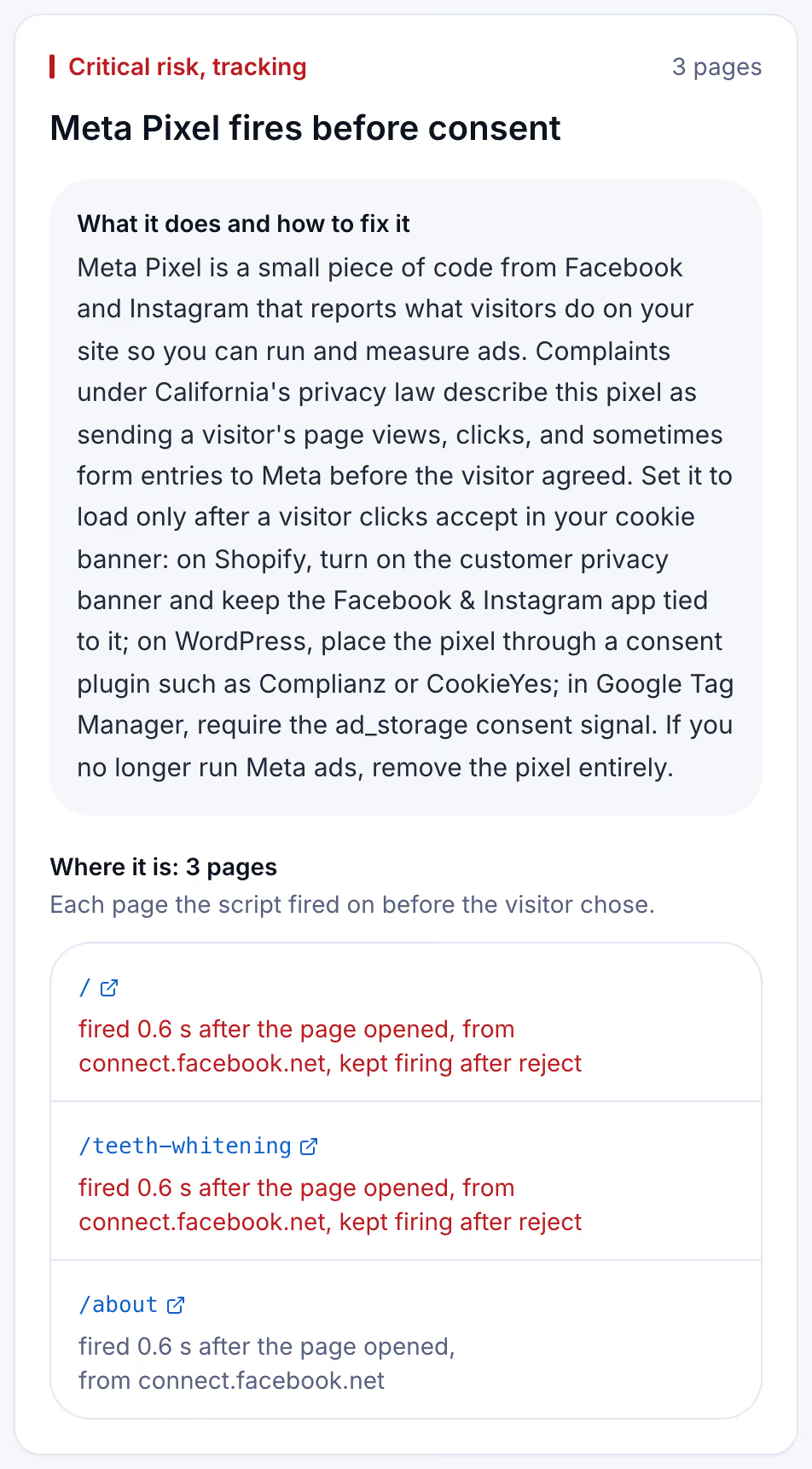
The scan logs every request from the moment a page starts loading until the network goes quiet or 8 seconds pass, without clicking anything, and matches each one against the 43 scripts in its catalog. It then presses reject when a banner offers it, never accept, and watches 3 more seconds. The methodology page sets out the rules.
Keeping the banner working after plugin updates
A WordPress banner rarely stays the way it was set. A plugin update adds a script the consent plugin does not recognize, a new marketing plugin pastes a pixel into the footer, or a caching plugin serves a page built before the banner's settings changed. Each of those puts a tracking request back in front of the banner, and nobody opens the network panel afterwards.
A free scan is one dated snapshot of 5 pages. Suitcast's Monitor plan scans up to 100 pages every week, keeps every report with its PDF, and sends a weekly email naming the scripts that are new since the last scan, the fixes that did not hold, and the new filings that match the site by state, industry or script. It costs $39 a month or $390 a year, less than one hour of a privacy lawyer's time. A dental practice on WordPress running Meta ads, or a law firm whose site carries Site Kit and a LinkedIn tag, sees the week a plugin update let a tracker through. An agency that maintains WordPress sites for clients covers five of them on Pro for $79 a month or $790 a year, with its own name on each PDF. The pricing page compares the plans.
Limitations
This guide quotes California Penal Code sections 631, 637.2, 638.50 and 638.51 and the enrolled text of Senate Bill 690 as published on leginfo.legislature.ca.gov, the plugin listings on wordpress.org, Site Kit's documentation and its version 1.188.0 source code, WordPress.com's support pages and posts on make.wordpress.org, all read on September 27, 2026. The table describes what each plugin's documentation says; this guide did not install each plugin, and a plugin's behavior depends on its settings, its version and the other plugins on the site. Whether a given setup breaks CIPA is a question for a lawyer and a court, not a scan. Nothing here is legal advice; the not legal advice page says what a score and a count mean.
A scan sees only what leaves a visitor's browser on public pages. Events sent from the site's server, such as Meta's Conversions API, are invisible to it. The complaint counts are verified federal filings plus state filings with a public source, and state-court coverage is partial, so the counts are a floor.
Suitcast identifies risk indicators. It is not legal advice and does not determine compliance.
Last updated September 27, 2026.