
The Meta Pixel sends a visitor's page views, clicks and browser details to Meta the moment a page opens, unless the site holds it back. Website tracking complaints under the California Invasion of Privacy Act, CIPA, name it in 140 verified complaints in the 12 months to September 25, 2026. Holding it until a visitor accepts takes one consent call, or one setting on most platforms.
What the Meta Pixel sends before a visitor chooses
The Meta Pixel is a script from Meta that reports what visitors do on a website so the owner can measure and target Facebook and Instagram ads. Meta's own developer documentation lists what it receives:
- HTTP headers, which Meta says may include the IP address, information about the web browser, the page location, the document and the referrer.
- Pixel-specific data, the pixel ID and the Facebook cookie.
- Button click data, including the buttons visitors click, their labels and the pages visited as a result.
- Optional values, such as a conversion value or page type, when the site sends them.
- Form field names, such as email, address and quantity. Meta says it does not capture field values unless they are sent through advanced matching or conversion tracking.
Advanced matching is the part that carries identity. Meta's advanced matching documentation shows a site passing a visitor's email address, first and last name, phone number, city, state and zip code into the pixel, which hashes them with SHA-256 before sending. Meta also offers automatic advanced matching, switched on in Events Manager rather than in code.
None of that is unusual for an ad pixel. What turns it into the subject of a complaint is the order of events: a request to connect.facebook.net leaving the browser before the visitor has answered the site's banner. Suitcast's free scan records exactly that sequence, with the second each request fired.
Why website tracking complaints name the Meta Pixel
Website tracking complaints rest on two sections of the California Penal Code. Section 631(a) reaches anyone who, "willfully and without the consent of all parties to the communication", reads or attempts to learn the contents of a communication while it is in transit. Section 638.51 bars installing or using a pen register without a court order, and section 638.50 defines a pen register as a device or process that records dialing, routing, addressing or signaling information, "but not the contents of a communication".
Section 637.2 sets the price: the greater of five thousand dollars per violation or three times actual damages, and subdivision (c) says the plaintiff need not have suffered actual damages. All four sections were read on leginfo.legislature.ca.gov on September 25, 2026.
The Meta Pixel sits near the top of the filings. On Suitcast's tracker catalog, in the 12 months to September 25, 2026, it is named in 140 verified complaints, behind Google Analytics 4 with 164 and the Google Ads tag with 160, and ahead of TikTok Pixel with 118. The catalog rates it critical, the highest of its three risk levels. On the Meta Pixel page, medical and health providers account for 14 of those complaints, more than any other industry, which is why a dental or medical practice running Facebook ads is the reader this guide has in mind.
One bill could change part of this. Senate Bill 690, as enrolled, would let only the Attorney General sue over section 638.51 claims arising from a website or app, applying to pending claims in actions filed within two years before it takes effect. It leaves section 631 claims as they are. It was presented to the Governor on September 4, 2026, and leginfo showed no later action on September 25. Check its status again before relying on it, and if a letter has already arrived, the CIPA demand letter guide covers the first week.
Meta's own switch: revoke first, grant on accept
Meta publishes the hold itself. Its documentation says to call fbq('consent', 'revoke') to pause sending pixel fires to Meta, and fbq('consent', 'grant') once consent is granted, and adds that the revoke call must run on every page. In the pixel's base code the order is:
fbq('consent', 'revoke');first, on every page, before anything else runs.- The base code's own
fbq('init')andPageViewlines, unchanged. fbq('consent', 'grant');inside the banner's accept handler, and nowhere else.
This is the route for a pixel pasted into a theme or a site header by hand. A developer puts the revoke line above init and wires the grant line to the accept button of whichever banner the site uses. If the visitor rejects or never answers, the grant never runs.
Meta has also changed its own checking tool. Its documentation, updated July 30, 2026, says the Chrome extension formerly called Meta Pixel Helper is now Meta Ads Data Advisor, and that it can now set up the Meta Pixel and the Conversions API automatically, including through Google Tag Manager, as well as show a badge with the number of pixel events fired on a page. A pixel set up that way is new code on the site, and it needs the same consent hold as the one it replaced.
Where your pixel lives decides how to hold it
Most small business sites install the pixel through their platform, not by hand, and each platform documents its own behavior. The table follows each vendor's documentation as read on September 25, 2026.
| Where the pixel was added | What the platform documents | How to hold it |
|---|---|---|
| Shopify, the Facebook & Instagram app | An app pixel's customer privacy settings are set by the app's developer; the banner is off for US visitors by default | Add the United States to the banner's regions, then check the app pixel under Settings, Customer events, View customer privacy |
| Shopify, pasted into theme code | The banner governs Shopify's own tools and pixels, not code pasted into the theme | Remove the pasted code and use the app, or add Meta's revoke and grant calls |
| Wix, Marketing Integrations | With a cookie banner, the pixel gathers data only after the visitor consents | Turn on the cookie banner; Facebook Ads with Wix connects the pixel by itself when it creates a campaign |
| Squarespace, Meta Pixel & Ads panel | The banner restricts cookies from some third-party services, but not all | Turn on the banner with a decline button, then test whether the pixel waits |
| WordPress, Meta's plugin | Meta's plugin installs the pixel and the Conversions API; its page says nothing about consent | Load the pixel through a consent plugin that blocks scripts until accept |
| Google Tag Manager | A tag set to require consent fires only if every listed consent type is granted | In the tag's Advanced Settings, Consent Settings, require ad_storage |
Read the table by the first column. On Shopify, Shopify's Customer Privacy API documentation says that outside regions configured to require consent, "the default behavior is to allow all processing purposes", so an app that follows the API still sends data for a US visitor until the banner covers the United States; the Shopify banner guide has the steps. On Wix, Wix's help center states that with a cookie banner the Meta Pixel "will only gather data after a visitor provides consent". Squarespace's cookie documentation says the banner "disables or restricts cookies placed by some third-party services connected to your site, but not all", and its Meta Pixel article does not say which group the pixel falls in, so the test below is the answer.
In Google Tag Manager's consent settings, "Require additional consent for tag to fire" makes a tag fire only when every consent type listed is granted, and the Consent Overview page lists every tag still in the "not set" state. Google lists Complianz and CookieYes among the consent platforms that integrate with it, which is also the WordPress route. The same per-tag setting holds Google's own tags, which the Google Analytics 4 guide covers.
How to check whether your pixel waits
A setting is only half the fix. Test the page a customer lands on, in this order, which is the same five-minute test the cookie banner guide walks through for every script:
- Open the page in a private window with the browser's network panel recording, and type
facebookinto the filter box. - Do not touch the banner. Any request to
connect.facebook.netorfacebook.com/trhas already left. - Open the Application tab and look for an
_fbpcookie, which Meta says the pixel saves when it uses first-party cookies. - Click reject, reload, and look again. A request that still appears is a pixel that ignores the choice.
- Fix it where the pixel lives, using the table above, and repeat steps 1 to 4.
A scan does the same thing across several pages instead of one. The card below comes from a Suitcast report on a reserved example address: a dental practice where the pixel fired on four pages before any choice, and kept firing after reject on the booking page.
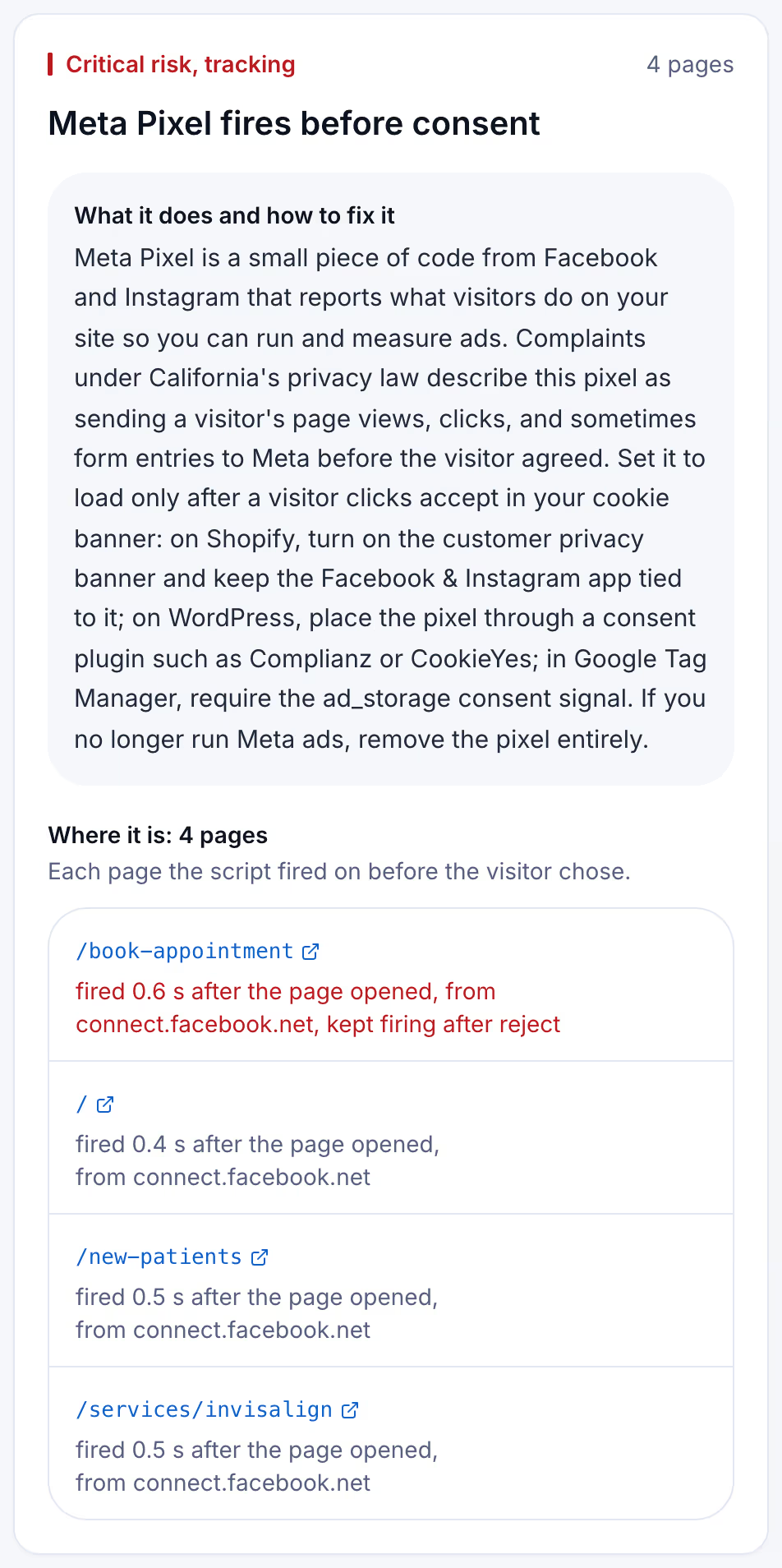
The scan logs every request from the moment a page starts loading until the network goes quiet or 8 seconds pass, without clicking anything, and matches each one against the 43 scripts in its catalog. It then looks for a consent banner, presses reject when one is offered, never accept, and watches 3 more seconds. The methodology page sets out the rules.
Keeping the pixel held after the next campaign
A Meta Pixel rarely stays the way it was fixed. Wix connects the pixel by itself when an owner creates a dynamic ad campaign through Facebook Ads with Wix, Meta's Data Advisor now offers to install the pixel and the Conversions API from the browser, and an agency or a new app can paste the base code back into a theme. Each of those puts a request to Meta back in front of the banner, and nobody opens the network panel afterwards.
A free scan is one dated snapshot of 5 pages. Suitcast's Monitor plan scans up to 100 pages every week, keeps every report with its PDF, and sends a weekly email naming the scripts that are new, the fixes that did not hold, and the new filings that match the site by state, industry or script. It costs $39 a month or $390 a year, less than one hour of a privacy lawyer's time. A dental practice on WordPress running Facebook ads, or a Shopify store running Meta and TikTok campaigns, gets the same check every week without asking anyone. An agency covers five client sites on Pro for $79 a month or $790 a year, with its own name on each PDF. The pricing page compares the plans.
Limitations
This guide quotes California Penal Code sections 631, 637.2, 638.50 and 638.51 and the enrolled text of Senate Bill 690 as published on leginfo.legislature.ca.gov, and Meta, Shopify, Wix, Squarespace and Google documentation, all read on September 25, 2026. Vendors change their settings and documentation without notice, and whether a given pixel setup breaks CIPA is a question for a lawyer and a court, not a scan. Nothing here is legal advice; the not legal advice page says what a score and a count mean.
A scan sees only what leaves a visitor's browser. Events sent through the Conversions API go from the site's server to Meta and are invisible to it, and so is anything Meta does with the data afterwards. The complaint counts are verified federal filings plus state filings with a public source, and state-court coverage is partial, so 140 is a floor; the dataset explains how cases are counted.
Suitcast identifies risk indicators. It is not legal advice and does not determine compliance.
Last updated September 25, 2026.