
A page title is the text in a page's HTML title element: the name on the browser tab and the link in search results. A page with no title, or a default one such as "New page", fails WCAG success criterion 2.4.2, and the firm filing the most website accessibility cases cites page titles in 132 complaints in 12 months. Each page's title is set in its SEO settings.
What WCAG requires of a page title
Success criterion 2.4.2, Page Titled, is one sentence in the Web Content Accessibility Guidelines, WCAG 2.2: "Web pages have titles that describe topic or purpose." It is Level A, the lowest of WCAG's three levels, and Americans with Disabilities Act, ADA, website complaints measure sites against WCAG.
W3C's explanation of the criterion says titles let visitors find content and know where they are "without requiring users to read or interpret page content", and that browsers show the title in the tab. People with visual disabilities use it to tell open pages apart, and people with cognitive disabilities, limited short-term memory or reading disabilities use it to identify content. The sufficient technique on an ordinary website is a descriptive title in the HTML title element.
W3C's list of failures, technique F25, shows that a title being there is not enough. It names as failures:
- authoring tool default titles, such as "Untitled Page" or "New Page 1";
- file names that do not describe anything, such as report.html;
- empty text, or filler and placeholder text;
- a site built from templates that gives every page the same title.
So there are two problems to look for: pages with no title at all, which code can find, and pages whose title does not say what the page is, which a person has to read.
What ADA website complaints cite about page titles
Page titles head the list for the firm filing the most website accessibility cases right now. Suitcast's firm pages list the issues found in the complaint text of each firm's verified filings, matched on words such as "page title" or "descriptive title".
On October 5, 2026, the page for Gottlieb & Associates, based in New York, shows 145 federal website accessibility dockets in 12 months, 74 of them in the last 90 days, the most recent on October 2, 2026. 144 of the 145 were filed in the Southern District of New York, against businesses in New York (38), California (30), Florida (10) and other states. Its page lists the page title first, in 132 complaints, and images with no description and links with no text in the same 132.
That pattern says something about how these complaints are written: a firm's complaint text often repeats a template from filing to filing, so the counts describe what the firm writes, not what a person tested on each site. Suitcast's dataset page counts 814 verified website accessibility filings nationally in the same 12 months. The New York guide covers the state and city laws those filings sit beside, and the firm ranking shows who else is filing.
Where page titles come from on each platform
Each of the four platforms below writes a title for every page by default, so a page with no title, or with the wrong one, comes from outside those defaults: a page built in another tool, a theme that dropped the title, or a setting that removed the page's own name. Where each one sets it, read in each platform's documentation or source code on October 5, 2026:
| Platform | Where you set it | What a page gets when you leave it blank | How a page ends up with no title, or a default one |
|---|---|---|---|
| Shopify | The page's Search engine listing, Edit website SEO, Page title (up to 70 characters); the home page in Online Store, Preferences | The theme uses the content's title with the shop name | A theme whose theme.liquid has no title tag |
| WordPress | The page or post title | The site title alone, on a page whose title field is empty | A classic theme with neither title tag support nor its own title element |
| Squarespace | Page settings, SEO tab, SEO Title (up to 100 characters); the format in SEO Settings, Search Appearance | The page title, then the site name, in the default format | A page title format with the page variable, %p, removed |
| Wix | Pages & Menu, the page's More Actions, SEO basics, Title tag | The page name followed by the home page title | A new page left as "New page" or a duplicate left as "Copy of" |
Read the table by the last column: those are the cases to look for on your platform. The sources are Shopify's SEO article and its Dawn theme code, WordPress core code (block themes always print a title; classic themes print one only when they declare support for it), Squarespace's title format article (updated April 13, 2026), and Wix's help center, whose Accessibility Wizard prompts an owner to rename a page when its title contains "New page" or "Copy of".
How to check every page's title
The check takes a few minutes for a small site. Suitcast's free scan finds pages with no title, placeholder titles, and titles shared by the pages it reads; the steps below cover the rest.
- List the pages. Home, services or products, booking or contact, and every landing page an agency or an ad campaign added, including pages built in another tool.
- Read each browser tab. Open each page and read its tab. A tab showing only the site name, "Untitled", "New page" or "Copy of Home" needs a new title.
- Look at the source. Right-click, choose View Page Source, and search for the title element near the top, as Shopify's help center describes. It should be there once and hold real words.
- Run Lighthouse in Chrome's developer tools on any page in doubt. A missing title is reported as "Document doesn't have a
<title>element". - Compare the titles side by side. Put them in a list. Two pages with the same title, such as two locations both called "Locations", fail even though each has one.
- Fix each in the page's SEO settings, from the table above: the page's own topic first, then the business name, which most platforms add for you.
What Suitcast's scan flags, and what it cannot judge
Suitcast's scan checks page titles in two ways. The open source axe engine's title rule, one of the scan's 44 automated accessibility checks, looks at one page at a time and checks that it has a title that is not empty. A second check, added on October 5, 2026, compares the titles of all the pages a scan reads. Both were run that day against sample pages the way the scan runs them, after each page had loaded and settled.
The title rule flagged a page with no title element, an empty title, a title of spaces only, a page whose only title was a social sharing tag (og:title), and a page whose only title sat inside an SVG image. The comparison flagged two different pages that shared one title, a page titled "New Page | Rosa's Bakery", and a page whose script changed its title to "Untitled" after loading. It did not flag one product reachable at two addresses that declare the same canonical page, or an artwork page titled "Untitled | Rosa's Gallery wall".
No check can judge whether a title that is unique actually describes its page, so step 2 still needs a person. The comparison also sees only the pages a scan reads, 5 pages on a free scan, and it leaves titles that begin with "Copy of" alone, because real page titles can begin with those words; reading the tabs in step 2 catches them.
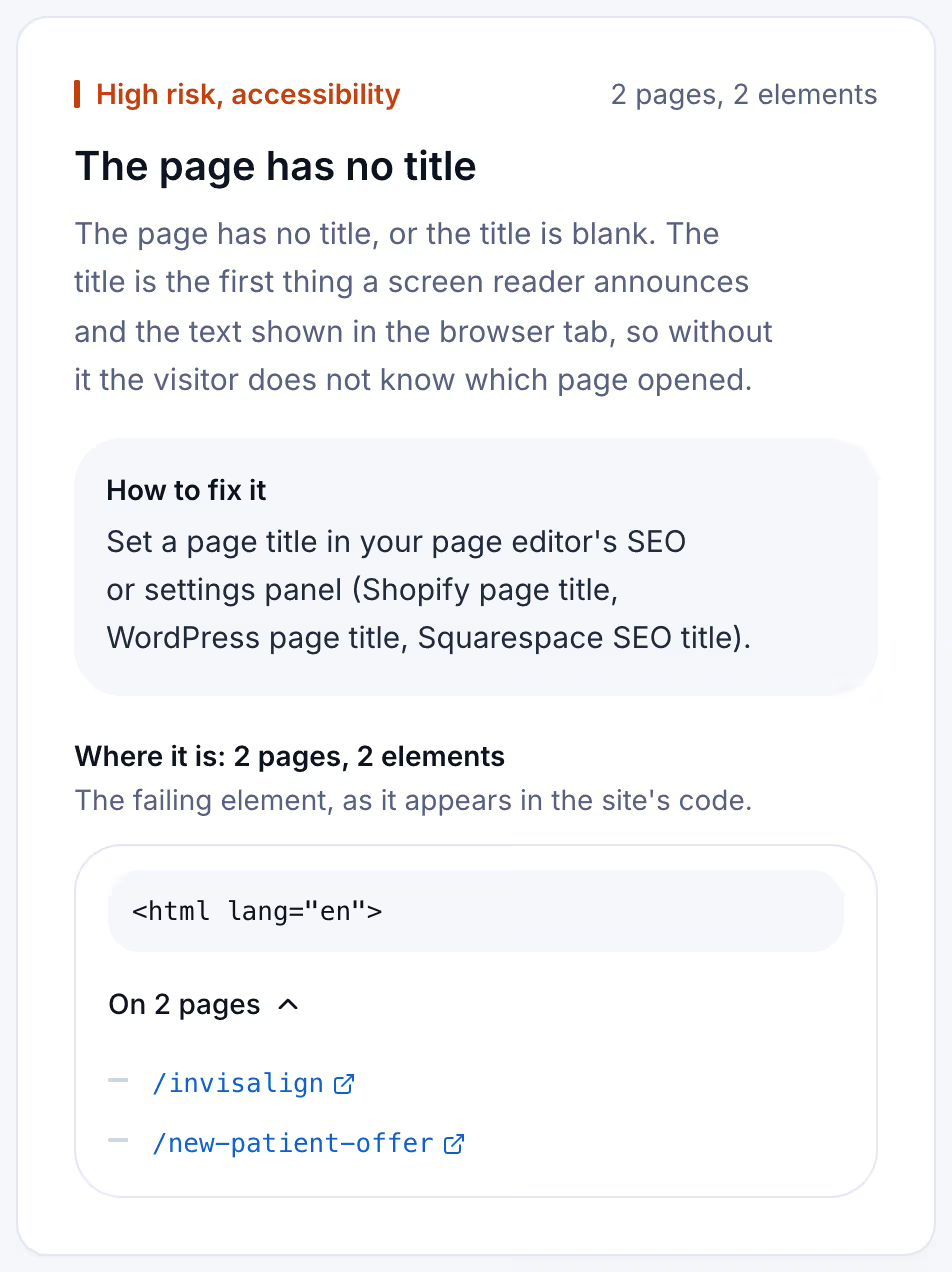
The card below is the scan's side of it, from a Suitcast report on a reserved example address: a dental practice whose two campaign landing pages, an offer for new patients and an Invisalign page, have no title, while the rest of the site does.
The methodology page explains how the scan counts and scores what it finds, and the empty links guide covers the unnamed links and buttons the same firm's complaints cite beside titles.
Keeping page titles right as the site grows
Titles go missing when pages are added, not when they are edited. An agency launches a landing page for a spring offer, a staff member duplicates a page and publishes "Copy of Services", a new theme drops a line from its template. Nobody reads the tab afterwards.
A free scan is one dated snapshot of 5 pages. Suitcast's Monitor plan scans up to 100 pages every week, keeps every report with its PDF, and sends a weekly email naming the failures that are new, the fixes that did not hold, and the new filings that match the site by state and industry. It costs $39 a month or $390 a year, less than one hour of a lawyer's time. A dental practice whose agency adds a landing page for each campaign, or a restaurant group on Wix adding a page per location, sees the date a page with no title appeared. An agency covers five client sites on Pro for $79 a month or $790 a year, as the agency guide describes. The pricing page compares the plans, and whether each title describes its page still needs a person.
Limitations
This guide quotes WCAG 2.2, W3C's Understanding document for success criterion 2.4.2 and failure technique F25, Shopify's help center and Liquid documentation, Shopify's Dawn theme code, WordPress core code, and the help centers of Squarespace and Wix, all read on October 5, 2026. The scan test used sample pages and the scan's own rules; SEO apps and plugins can change how a platform writes titles.
The firm counts come from complaint text and are floors: demand letters are not counted and state-court coverage is partial, as the dataset explains. A page title is one criterion of many, and the ADA check guide covers the rest. Whether a site meets the ADA is a question for a lawyer and a court, not a scan. Nothing here is legal advice; the not legal advice page says what a score and a count mean.
Suitcast identifies risk indicators. It is not legal advice and does not determine compliance.
Last updated October 5, 2026.