
An empty link, button or form field is one with no name a screen reader can announce, so a blind visitor hears only "link", "button" or "edit text". Americans with Disabilities Act, ADA, website complaints cite them by name: Gottlieb & Associates cites links with no text in 131 complaints in the 12 months to September 29, 2026. The fix is a name: text, alt text or a label.
What an empty link, button or form field is
An empty link, button or form field is a control with no accessible name, the word a screen reader reads out when the visitor reaches it. A text link's name is its text. A linked image's name is its alt text. A field's name is its label. When none of these exists, the screen reader announces only the kind of control, and the visitor has to guess.
The Web Content Accessibility Guidelines, WCAG, which ADA website complaints use as their yardstick, set this out in two success criteria. Success criterion 2.4.4 requires that "the purpose of each link can be determined from the link text alone" or from the text with its context. Success criterion 4.1.2 requires that for "all user interface components (including but not limited to: form elements, links and components generated by scripts), the name and role can be programmatically determined".
Testing tools use their own words for the same three failures. WebAIM's report calls them empty links, empty buttons and missing form input labels. Lighthouse, the audit built into Chrome, prints "Links do not have a discernible name", "Buttons do not have an accessible name" and "Form elements do not have associated labels". Suitcast's report calls them links have no text, buttons have no text and form fields have no label. An owner who has seen any of these lines has seen this problem, and the ADA check guide places it among the other failures complaints cite.
Why ADA website complaints cite links, buttons and labels
ADA website complaints list the barriers a plaintiff met with a screen reader, and unnamed controls are among the easiest to describe. Suitcast counts 822 verified website accessibility filings in the 12 months to September 29, 2026 on its dataset page. The firms filing them publish the same few items again and again.
The Gottlieb & Associates firm page shows the firm named on 144 federal website accessibility dockets in those 12 months, 67 of them in the last 90 days, most recently on September 25, 2026. Its complaints cite a page with no title, images with no description and links with no text, each in 131 complaints; the page title guide covers the first. Most of its verified filings are against businesses in New York, where the New York lawsuits guide covers the state and city laws. The Joseph & Norinsberg page lists form fields with no label in 46 complaints, buttons with no text in 41 and links with no text in 36. The issue lists come from complaint text, and firms reuse templates, so they describe what the complaints say rather than what each site had.
The same failures are common on the web at large. The WebAIM Million, an automated test of the top one million home pages in February 2026, found:
- empty links on 46.3% of home pages;
- empty buttons on 30.6%;
- missing form input labels on 51%, with 33.1% of all form inputs unlabeled;
- that 45% of images missing alt text were inside links, so one linked image in four had no alt text.
Suitcast's free scan checks the same three failures on five public pages, and shows each failing element as it appears in the site's code.
Where unnamed links and buttons come from on a small business site
A control ends up with no name when it shows an icon or an image instead of words, so the places to look are the ones that look self-explanatory to a sighted visitor:
- The logo, linked to the home page, as an image with no alt text.
- Social icons in the header or footer, drawn as SVG images inside links with no text.
- Icon buttons: the menu button on phones, the magnifier that opens search, the cart, the arrows on a photo slider, and the X that closes a pop-up.
- Form fields in a newsletter box, a booking widget or a quote form, labeled only by placeholder text inside the box.
- Clickable boxes built from plain page elements with a script attached, which the Brasil Brasil firm page lists as clickable items that are not real links or buttons, in 12 of its complaints.
The platforms' own defaults usually name these. In WordPress's code, the Social Icons block falls back to the service name, such as "Instagram", as hidden screen reader text; the Search block keeps its label in the code when it is hidden; and the Navigation block's phone menu buttons carry "Open menu" and "Close menu". Shopify's Dawn theme adds hidden text such as "Instagram" and "Cart" to its icons and names its search and menu buttons. So when a scan flags an unnamed control, check first what was added on top of the defaults: a third-party theme, a page builder, an app's pop-up or chat button, or HTML pasted into a page.
How to fix them in Shopify, WordPress, Squarespace and Wix
The fix is the same on every platform: give the control a name. Following the W3C's own techniques, that means:
- A linked logo or image gets alt text that says where the link goes, such as
alt="Harbor Dental home", per W3C technique H30. - A social icon gets text inside the link, such as "Instagram", hidden visually if the design has no room for it.
- An icon button gets an
aria-label. The W3C's example is the "×" button that closes a dialog, named "Close". - A form field gets a
labeltied to it. The label can be hidden visually and stay in the code, which the W3C forms tutorial describes; placeholder text does not count, because, in the tutorial's words, it "is not a replacement for labels".
Where each platform puts that name, as documented on September 29, 2026:
| Platform | What names controls by default | What to check or change |
|---|---|---|
| Shopify | Dawn names its social icons, cart, search and menu; Theme Store themes need an average Lighthouse accessibility score of 90 on product, collection and home pages | Icons from apps and custom Liquid code: ask the developer for hidden text or an aria-label |
| WordPress | Social Icons (a Text field per icon, falling back to the service name), Search (hidden label kept), Navigation (Open menu, Close menu) | Theme and page builder icons, and a linked logo: alt text naming the destination |
| Squarespace | Its help pages ask for link text that describes the purpose and a label on each form field | Its social icon articles describe no label setting, so test them; linked images take alt text describing the function |
| Wix | Studio Editor buttons have an Accessible name setting; the hamburger menu takes an accessible name | Old Wix Forms, which Wix says are not accessible: move to the new Wix Forms and turn on Show field title |
Read the table by the last column: it lists what each platform's defaults leave to the owner. Wix's Accessibility Wizard does not list link or button names among the issues it detects, and Wix describes descriptive link and button text as a task for the owner, so a Wix site needs a separate check. An overlay widget is not that check either; the widgets guide sets out what they do and do not change. The alt text guide covers the image settings on all four platforms, which also fix a linked logo.
How to find every empty link, button and field
Test the pages a customer uses most, the home page, a service or product page and the contact or booking page, in this order:
- Run Lighthouse. In Chrome, open the developer tools, choose Lighthouse, tick Accessibility and run it. Look for the three failure lines above; each lists the elements that failed.
- Tab through the page. Press Tab to move from control to control. Every link, button and field you land on should be one you can name from what you see.
- Listen. On a Mac, press Command+F5 to start VoiceOver; on Windows, install NVDA, which is free. Tab through again and listen for "link", "button" or "edit text" with nothing after it.
- Open the pop-ups. Newsletter boxes, cookie banners and chat windows load after the page, and their close buttons are a common miss.
- Fix and repeat steps 1 to 4 on the same pages.
A scan does this across several pages at once. The card below comes from a Suitcast report on a reserved example address: a dental practice whose linked logo and two footer social icons had no text on each of three pages, so one fix in the theme covers all nine.
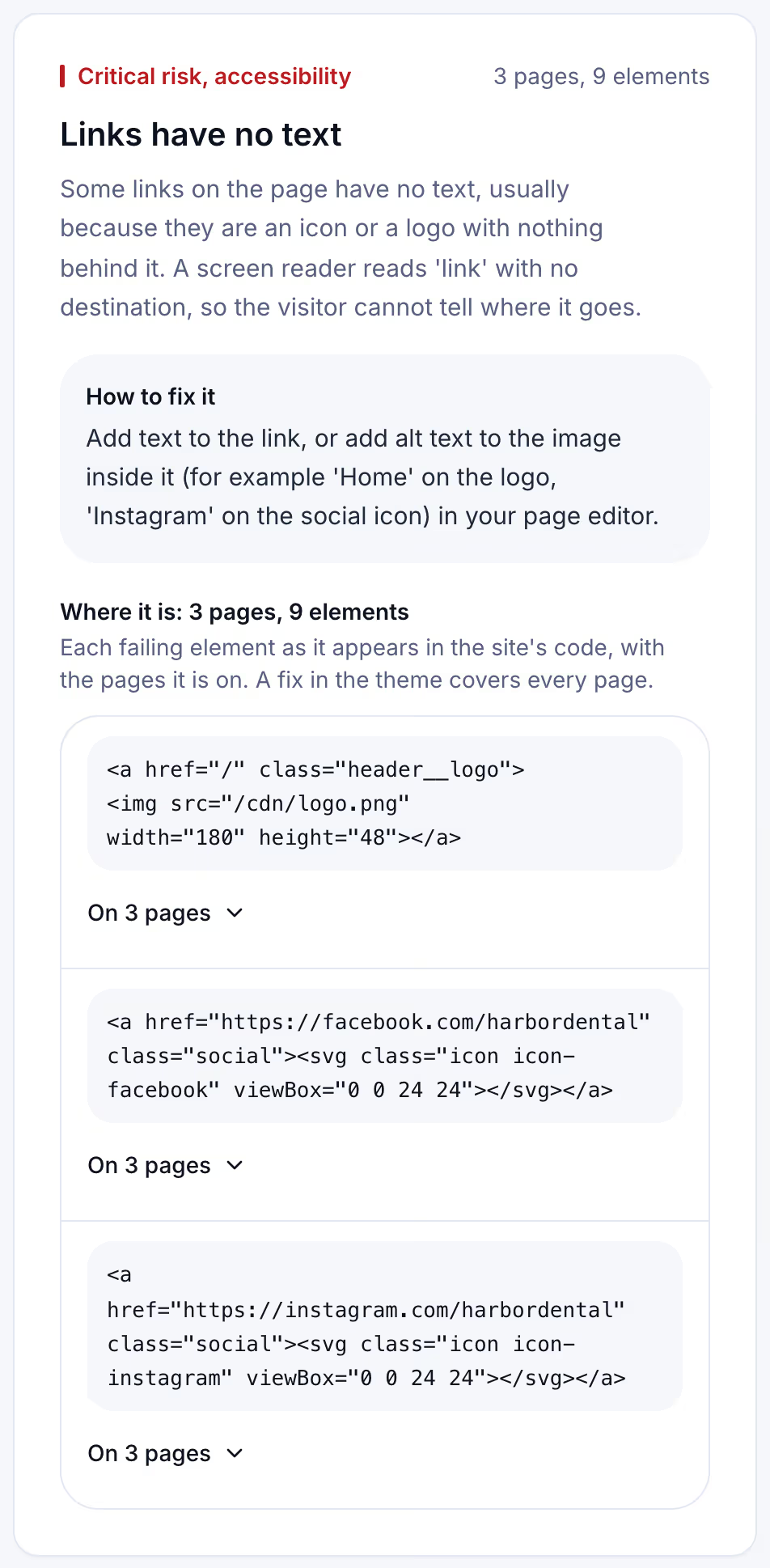
The scan runs the checks behind links with no text, buttons with no text, form fields with no label, dropdown menus with no label, and custom buttons and form controls with no name, among its 44 automated accessibility checks. The methodology page sets out how each one is run and counted.
Keeping links and buttons named after the next update
Unnamed controls come back with ordinary changes. A new app adds a chat bubble or a reviews carousel with icon-only buttons, a theme update redraws the social icons, a marketing hire adds a newsletter pop-up with a placeholder instead of a label. Each change arrives quietly, and nobody tabs through the page again.
A free scan is one dated snapshot of 5 pages. Suitcast's Monitor plan re-scans one site, up to 100 pages, every week, and emails what changed: failures that are new, with the date they appeared, failures that are gone, and new lawsuits filed over the same issues. It costs $39 a month or $390 a year, less than one hour of a lawyer's time, with every report kept and a PDF for each. It suits a dental practice on WordPress with a booking plugin, or a Shopify store that installs apps every season. An agency with client sites covers five on Pro for $79 a month or $790 a year, with its own name on each PDF, which the agency guide describes. The pricing page compares the plans.
Limitations
This guide quotes WCAG 2.2 and W3C techniques and tutorials on w3.org, the WebAIM Million 2026 report, Lighthouse's source code, WordPress's Gutenberg code and documentation, Shopify's Dawn theme code and developer documentation, and Squarespace and Wix help centers, all read on September 29, 2026. Platforms change their themes and settings without notice, and a third-party theme may behave differently from the defaults described here.
An automated check finds a control with no name. It cannot judge whether a name that exists is meaningful, such as a link named "more" among twenty others, and it does not test whether a checkout works by keyboard. Complaint issue counts come from complaint text and cover verified federal filings plus state filings with a public source. Suitcast identifies risk indicators; it is not legal advice and does not determine compliance. The not legal advice page says what a score and a count mean, and the ADA letter guide covers what to do if one has arrived.
Suitcast identifies risk indicators. It is not legal advice and does not determine compliance.
Last updated September 29, 2026.