
Low contrast text is text too close in color to its background: light gray on white, white on a pale button, captions on a bright photo. The Web Content Accessibility Guidelines ask for a contrast ratio of at least 4.5 to 1 for normal text. WebAIM found low contrast on 83.9% of the top million home pages in 2026, and a scan plus a contrast checker finds it on yours.
What WCAG requires for text contrast
Contrast ratio is a number from 1 to 21 that compares how light two colors are: black on white is 21 to 1, white on white is 1 to 1. The Web Content Accessibility Guidelines, WCAG 2.2, define it from the relative luminance of the lighter and darker color, so any two colors give one exact ratio, and a checker only needs the two color codes.
Americans with Disabilities Act, ADA, website complaints measure sites against WCAG, and two of its Level AA success criteria cover color:
- 1.4.3 Contrast (Minimum): "The visual presentation of text and images of text has a contrast ratio of at least 4.5:1", except large text, which needs 3 to 1. Text that is part of a logo, pure decoration or an inactive control has no requirement.
- 1.4.11 Non-text Contrast: the parts needed to identify a control and its state, such as a form field's border, and the parts of a graphic needed to understand it, need 3 to 1 against adjacent colors.
Large text means at least 18 point, or 14 point bold. W3C's explanation of 1.4.3 converts that to about 24 CSS pixels, or about 18.5 pixels bold, and says the rule also covers placeholder text in form fields and text shown on hover or focus. WCAG's definition adds that contrast is measured against the background the text is rendered over, so text on a photo is measured against the photo.
How common low contrast is, and what complaints cite
Low contrast text is the most common accessibility failure on the web. The WebAIM Million, WebAIM's yearly automated review of the top million home pages, found it on 83.9% of home pages in February 2026, up from 79.1% in 2025, with an average of 34 instances on each home page, up 15% in a year. It has been the most common failure every year since 2019.
Complaints cite it less often than they cite missing alt text or unnamed links. Suitcast's firm pages list the issues found in the complaint text of each firm's verified filings. On October 5, 2026, the page for Brasil Brasil, a Florida firm with 16 federal website accessibility dockets in 12 months, lists text hard to read against its background in 6 complaints. The page for Adams & Associates, also in Florida, lists it in 2. The Florida guide covers those firms, and the firm ranking shows the rest.
Suitcast's dataset page counts 814 verified website accessibility filings nationally in the 12 months to October 5, 2026. A firm's complaint text often repeats a template, so these counts say what a firm writes, not how many pages a person measured. The point for an owner is simpler: a failure on 83.9% of popular home pages is very likely on yours, and it is one of the cheapest to fix.
How to check color contrast on your website
Check the home page and the page where visitors do the one thing the business needs: book, order, call. Suitcast's free scan runs the automated half; the steps after it are the half a person does.
- Run an automated check. Suitcast's free scan, Lighthouse in Chrome's developer tools ("Background and foreground colors do not have a sufficient contrast ratio") or WebAIM's WAVE lists text below the ratio with the element and the page. Note each one.
- Look where tools cannot measure. Headlines and buttons on photos, slideshows and video, and text on gradients. Automated checks usually cannot tell what color sits behind the text there.
- Measure those by hand. Pick the text color and the lightest part of the background behind it, enter both into any contrast checker that reports the ratio, and compare with 4.5 to 1, or 3 to 1 for large text.
- Check the states. Hover over links and buttons, tab to them with the keyboard, and look at placeholder text inside empty form fields. Each state is text that 1.4.3 covers.
- Check icons and field borders against 3 to 1: a pale outline on a search box, a light gray cart icon, a checkbox that disappears on white.
- Write down the color pair for each failure. Most failures come from a handful of theme colors, so one change in the theme's color settings fixes every page that uses it.
The numbers make the fix concrete. By the WCAG formula, #999999 gray on white is 2.85 to 1 and fails; #767676 is 4.54 to 1 and passes, while #777777 is 4.48 to 1 and does not. White text on a #4A90D9 blue button is 3.34 to 1; the same blue darkened to #2A76C6 gives 4.66 to 1 and stays recognizably the same color.
What Suitcast's scan flags, and what it misses
Suitcast's scan runs 44 automated accessibility checks with the open source axe engine on each page it opens, and color contrast is one of them. To be exact about what it catches, the same rule was run on October 5, 2026 against a sample page built with thirteen contrast cases, the main ones below.
| Contrast case on the sample page | Ratio | Flagged by Suitcast's scan |
|---|---|---|
| Gray #999999 body text on white | 2.85 to 1 | Yes |
| Gray #949494 text at 16 pixels | 3.03 to 1 | Yes |
| The same gray at 24 pixels, large text | 3.03 to 1 | No, it passes as large text |
| White text on a #4A90D9 button | 3.34 to 1 | Yes |
| Dark text faded to 30% opacity | under 2 to 1 | Yes |
| Light gray text on a background photo | not measured | No |
| Light gray text on a gradient | not measured | No |
| Light gray placeholder in a form field | not measured | No |
| A pale gray outline icon | not text | No |
Read the table from the right. The Yes rows are failures an automated check catches every time it runs, with the element and the page. The two "not measured" background rows are where axe says it could not determine the background color; it files those as needing review rather than as failures, and Suitcast's scan keeps failures only. Placeholder text and icons are outside the rule, and a disabled button is exempt by WCAG itself. The scan also loads each page once at a desktop width, so it sees the colors of that one state, not hover or focus.
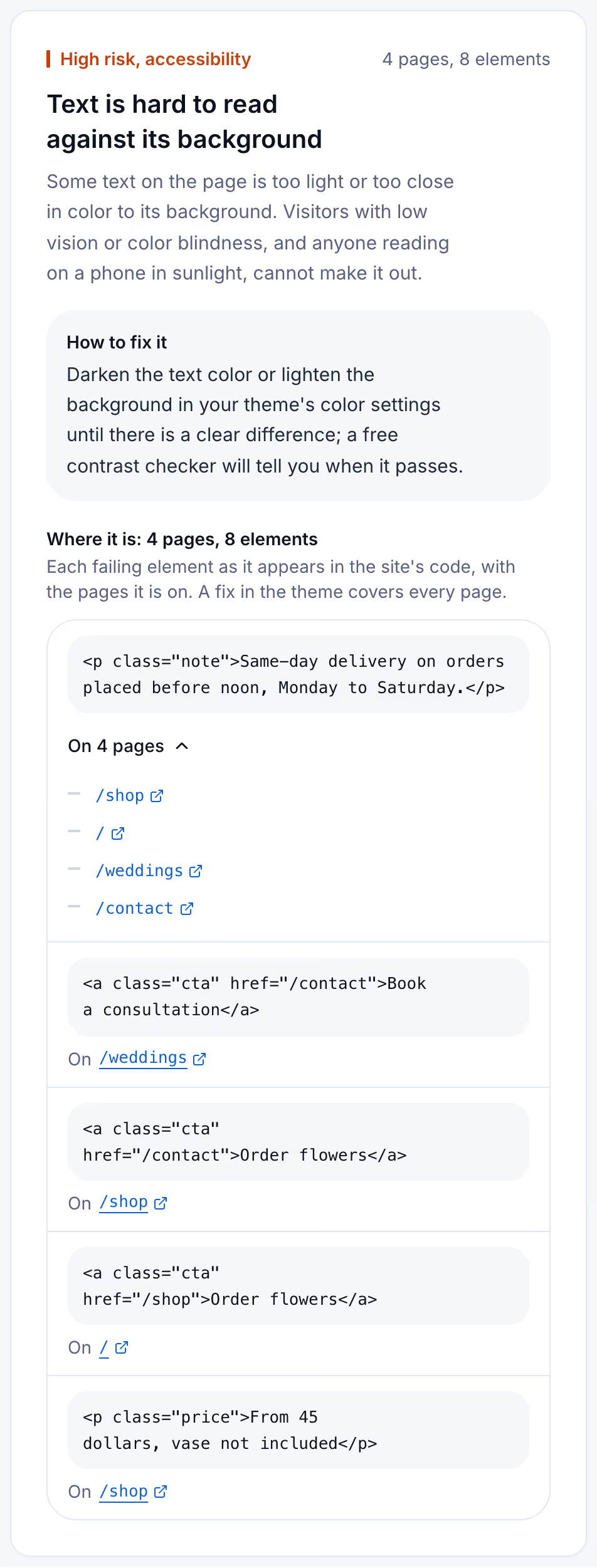
The card below is the scan's side of it, from a Suitcast report on a reserved example address: a florist whose footer note, price captions and blue order buttons fall short, found on four pages and grouped by element.
Where the colors live on Shopify, WordPress, Squarespace and Wix
Low contrast almost always comes from the theme's color settings, so the fix is a few color changes in one panel, not page by page. Where each platform keeps them, read in each help center on October 5, 2026:
- Shopify. In the theme editor, open Theme settings, then Colors. Most themes, including every free Shopify theme before Horizon 4.0.0, use color schemes: groups of background, text and button colors applied to sections, up to 21 per theme. Newer themes use a color palette of named brand colors. Shopify's help center lists both. Change the text or button color in the scheme a failing section uses, and every section on that scheme changes with it.
- WordPress. On a block theme, Appearance, Editor, then Styles, then Colors sets the site's palette and the default colors for text, links, headings and buttons, as WordPress's own documentation describes. The block editor warns as you choose colors for a block: "This color combination may be hard for people to read." Its source shows that the warning skips colors with transparency, so a faded color gets no warning. A classic theme sets its colors in its own settings, which its documentation names.
- Squarespace. Open the Site styles panel, then Colors. A site uses a five-color palette, and each palette has ten color themes that sections use. Squarespace's colors article (updated August 21, 2026) says text and button colors sometimes default to white or black for contrast, and that a theme's color tweaks change every section that uses that theme. Overlay colors over images have an opacity slider.
- Wix. The Accessibility Wizard has an "Improve color contrast" step that adjusts colors to the recommended ratio, and Wix's Contrast Checker app measures any pair. Wix's own article says there may be contrast the wizard does not identify and recommends reviewing it by hand, with the Colour Contrast Analyser for text over images.
After each change, run the check again. A darker text color fixes body text on every page at once; a button color fixes every button that uses it.
Keeping contrast fixed after the next design change
Contrast breaks quietly. A seasonal banner goes up with white text on a pale photo, a new section picks the light color scheme, an app adds its own pop-up with gray text. Nobody measures afterwards.
A free scan is one dated snapshot of 5 pages. Suitcast's Monitor plan scans up to 100 pages every week, keeps every report with its PDF, and sends a weekly email naming the failures that are new, the fixes that did not hold, and the new filings that match the site by state and industry. It costs $39 a month or $390 a year, less than one hour of a lawyer's time. A florist on Squarespace who changes the palette each season, or a dental practice on WordPress whose agency adds landing pages, sees the date a contrast failure appeared. An agency covers five client sites on Pro for $79 a month or $790 a year, as the agency guide describes. The pricing page compares the plans, and text on photos still needs the hand check above.
Limitations
This guide quotes WCAG 2.2 and W3C's Understanding document for success criterion 1.4.3, the WebAIM Million 2026 report, the help centers of Shopify, Squarespace and Wix, WordPress's documentation and the block editor's source code, all read on October 5, 2026. Ratios were computed with the WCAG formula. The scan test used one sample page and the scan's own rules; a real site's images, fonts and widgets can behave differently.
The firm counts come from complaint text and are floors: demand letters are not counted and state-court coverage is partial, as the dataset and the methodology page explain. Passing contrast is one criterion of many; the ADA check guide covers the others and the widgets guide explains why a toolbar does not change the measurement. Whether a site meets the ADA is a question for a lawyer and a court, not a scan. Nothing here is legal advice; the not legal advice page says what a score and a count mean.
Suitcast identifies risk indicators. It is not legal advice and does not determine compliance.
Last updated October 5, 2026.