
To test your website with only a keyboard, put the mouse aside and press Tab on each page. Focus should move in reading order, always show where it is, reach every link, button and form field, and never get stuck. This keyboard accessibility test takes five minutes, and it checks failures that Americans with Disabilities Act, ADA, website complaints cite and that an automated scan finds only in part.
What keyboard access means in WCAG
Keyboard access means a visitor can use the whole site without a mouse: the Tab key moves forward through links, buttons and fields, Shift and Tab move back, Enter follows a link, Space or Enter presses a button, and Escape closes a pop-up. Screen reader users and people who cannot hold a mouse steady move through pages this way.
The Web Content Accessibility Guidelines, WCAG 2.2, which website accessibility complaints measure sites against, set out what that requires in a handful of success criteria:
- 2.1.1 Keyboard (Level A): "All functionality of the content is operable through a keyboard interface."
- 2.1.2 No Keyboard Trap (Level A): if focus can move into a component with the keyboard, it "can be moved away from that component using only a keyboard interface."
- 2.4.1 Bypass Blocks (Level A): "A mechanism is available to bypass blocks of content that are repeated on multiple web pages."
- 2.4.3 Focus Order (Level A): focusable components "receive focus in an order that preserves meaning and operability."
- 2.4.7 Focus Visible (Level AA): there is a mode of operation "where the keyboard focus indicator is visible."
- 2.4.11 Focus Not Obscured (Minimum) (Level AA, new in 2.2): a focused component "is not entirely hidden due to author-created content", such as a sticky header or a cookie banner.
Each of these can be checked by a person with a keyboard in a few minutes. Only some of them can be checked by code, which is why the test below comes before any tool.
What ADA website complaints say about the keyboard
Keyboard failures sit near the top of what the busiest accessibility firms' complaints cite. Suitcast's firm pages list the issues found in the complaint text of each firm's verified filings, matched on the words the complaints use, such as "tab order", "focus order" or "only with a mouse".
On October 1, 2026, the page for Equal Access Law Group, the firm with the most website accessibility dockets in the 12 months on the firm ranking, lists clickable items that are not real links or buttons in 252 of its complaints and keyboard order forced out of sequence in 178. Its page shows 257 dockets in 12 months and none in the last 90 days, with its last filing on June 3, 2026. The page for Brasil Brasil, which files in Florida, lists both failures in 12 complaints each and no way to skip past the menu in 4; the Florida guide covers that state's firms.
Suitcast's dataset page counts 828 verified website accessibility filings nationally in the same 12 months. A firm's complaint text often repeats a template from filing to filing, so these counts say what a firm writes, not how many sites a person tested by hand.
The WebAIM Million, WebAIM's yearly automated review of the top million home pages, shows how common the building blocks are. In February 2026, home pages averaged 4.8 attributes of role="button" and 30.4 instances of tabindex="0" or tabindex="-1", up 17% in a year. Only 17.1% of home pages had a skip link, and one in ten of those was broken.
The five-minute keyboard test
Run it on the home page and on the page where visitors do the one thing the business needs: book, order, request a quote. Suitcast's free scan runs the automated half of these checks; this is the half a person does.
- Get the Tab key working. In Safari on a Mac, Tab reaches only fields and pop-up menus until "Press Tab to highlight each item on a webpage" is turned on under Safari, Settings, Advanced, as Apple's Safari guide describes. If Tab skips links in any browser, look for the same kind of setting first. Load the page and click the address bar once.
- Press Tab once. A "Skip to content" link should appear at the top. Press Enter, then Tab again: focus should land in the page's main content, not back in the menu.
- Keep pressing Tab. Watch for an outline or highlight at every stop. If focus seems to vanish, it has landed on something you cannot see, or the theme removed the outline. If it jumps from the header to the footer and back, the order has been forced.
- Open the menu and every pop-up. Enter or Space should open the menu and its submenus. Reach the cookie banner, the chat widget and any newsletter pop-up, use them, and press Escape or Tab to leave. If focus cannot get out, that is a keyboard trap.
- Finish one real task. Book the appointment, add a product to the cart and reach checkout, or send the contact form, using Enter, Space, the arrow keys in menus and Shift and Tab to go back. A button that responds only to a mouse click is the failure complaints call clickable items that are not real links or buttons.
- Write down the page and the element for each failure. That list is what a developer or the platform's support needs.
What each failure looks like and where it comes from
Each failure in the test has a usual cause in the site's code, and the cause decides who fixes it. The table follows the order in which the test finds them; the last column comes from a Suitcast test of its own scan on two sample pages, on October 1, 2026.
| What you notice | Usual cause | Where the fix lives | Flagged by Suitcast's scan |
|---|---|---|---|
| Tab jumps out of reading order | A positive tabindex value, such as tabindex="1" | Theme or template code | Yes |
| A button or tile cannot be reached at all | A div or span with a click handler and no tabindex | Theme, page builder or app code | No |
| Focus reaches an item, but it is not announced as a button | A focusable div with no role | Theme, page builder or app code | Yes |
| No outline shows where focus is | outline: none in the theme's styles | Theme styles | No |
| Every page starts with the whole menu | No skip link | Theme header | No |
| Focus disappears into a closed menu | Hidden content that can still take focus | Theme or app code | Yes |
| Focus cannot leave a pop-up or widget | A keyboard trap | The app or widget vendor | No |
Read the table from the right. The three Yes rows are what an automated check catches every time it runs; the four No rows need the test above. The Yes rows match the scan's rules for positive tabindex (tabindex), focusable items with no role (focus-order-semantics) and hidden focusable content (aria-hidden-focus). The scan also flags a scrolling box that the keyboard cannot reach.
What an automated scan finds, and what it misses
Suitcast's scan runs 44 automated accessibility checks with the open source axe engine on each page it opens. To be exact about the keyboard part, the same rules were run on October 1, 2026 against a sample page built with seven keyboard failures, and against a second page with a newsletter pop-up that traps focus.
The rules flagged four of the seven: a navigation link with tabindex="3", an "Order online" box built as a focusable div with no role, a gift card link inside content hidden from screen readers, and a scrolling box the keyboard could not reach. They did not flag a "Book a table" box with a click handler and no tabindex, because focus never reaches it, so no rule looks at it. They did not flag the theme's outline: none. And they did not flag the missing skip link: axe's skip check passes a page that has a heading, a main area or a link within the page, and files a failure as needing review rather than as a violation. On the second page, Tab kept returning focus to the pop-up's email field, and no rule flagged anything.
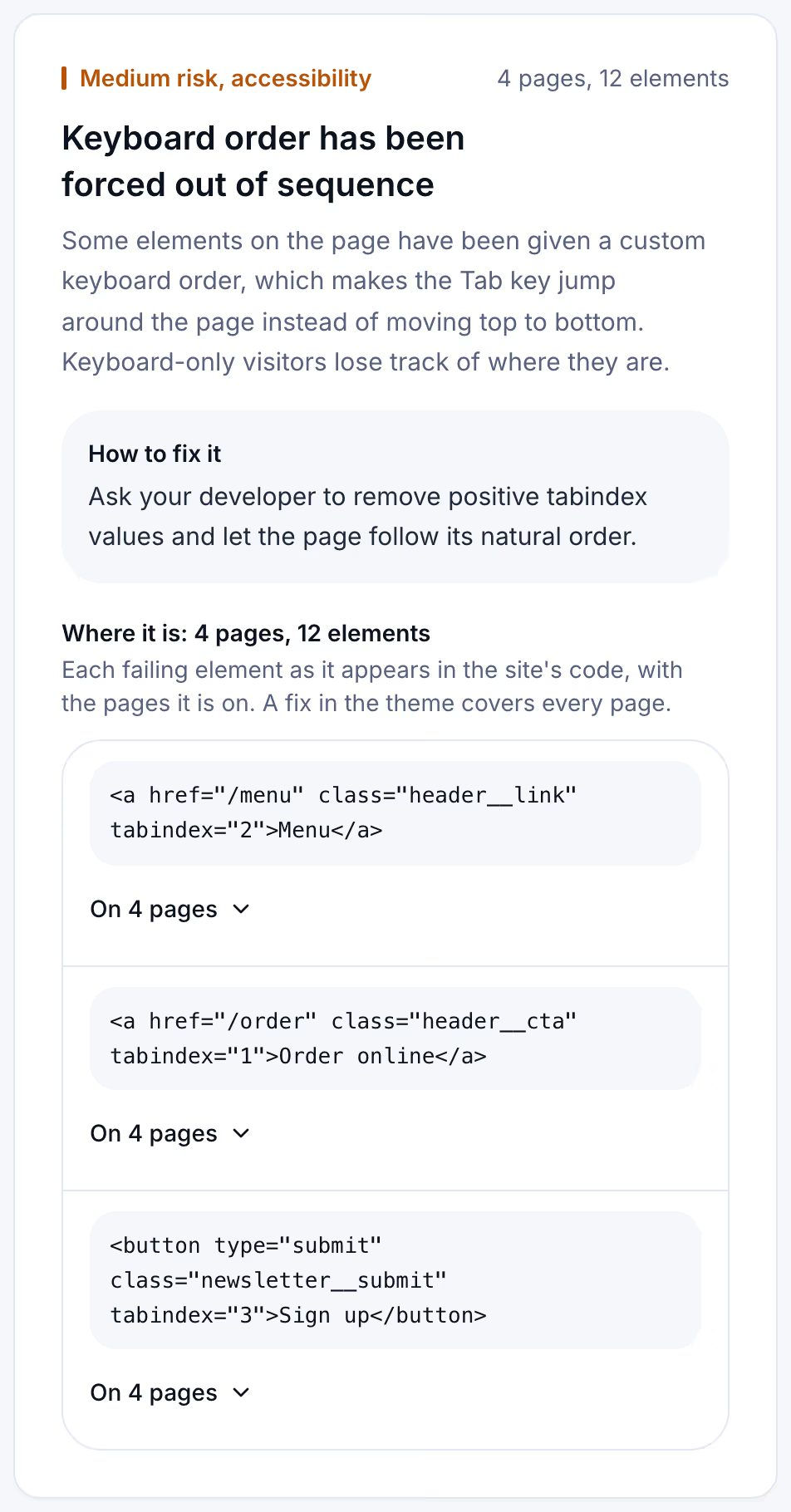
That is why the keyboard test above is not optional. The card below is the scan's side of it, from a Suitcast report on a reserved example address: a bakery whose theme gave its header links and newsletter button their own Tab order, found on four pages.
The methodology page lists how the scan counts and scores what it finds. The ADA check guide covers the other failures complaints cite, from alt text to contrast.
Where the fixes live on Shopify, WordPress and site builders
Most keyboard failures come from the theme or from an app, not from the owner's content, so one fix covers every page. Three places to start, checked on October 1, 2026:
- Shopify. Dawn, Shopify's reference theme, makes a "Skip to content" link to the main content the first element of every page. If the first Tab on your store shows no such link, the theme lacks one or something hides it, and the theme's developer fixes it. A menu or pop-up added by an app is fixed by that app's vendor.
- WordPress. WordPress core adds a "Skip to content" link to block themes, pointing at the template's main element. Classic themes carry their own, or none. Page builder buttons, sliders and pop-up plugins can add click-only boxes and traps; check each one with the test and ask its vendor about keyboard support.
- Squarespace, Wix and other builders. Where the template's code is not yours to edit, report the element and the page to the platform's support, and replace a third-party widget that traps focus with one that does not.
Removing a positive tabindex, turning a clickable div into a real <button> or <a href>, and restoring the focus outline are small code changes. The empty links and buttons guide covers the related failure of controls with no name.
Keeping keyboard access working
Keyboard access breaks quietly. A theme update reorders the header, a new booking widget arrives with click-only buttons, and a holiday pop-up traps focus until it is removed. Nobody presses Tab afterwards.
A free scan is one dated snapshot of 5 pages. Suitcast's Monitor plan scans up to 100 pages every week, keeps every report with its PDF, and sends a weekly email naming the failures that are new, the fixes that did not hold, and the new filings that match the site by state and industry. It costs $39 a month or $390 a year, less than one hour of a lawyer's time. A restaurant on a template site with online ordering, or a dental practice whose booking widget changes with every update, sees the date a tab order failure appeared. An agency checking client sites covers five on Pro for $79 a month or $790 a year, as the agency guide describes. The pricing page compares the plans, and the keyboard test above still needs a person after each big change.
Limitations
This guide quotes WCAG 2.2 and W3C's Understanding document for success criterion 2.4.1, the WebAIM Million 2026 report, Apple's Safari user guide, Shopify's Dawn theme code and WordPress core code, all read on October 1, 2026. The scan test used a sample page and the scan's own rules; a real site's widgets can fail in ways the sample does not show. A keyboard test by the owner is not a full audit, which adds screen reader testing against every WCAG criterion, and the ADA website lawsuit letter guide explains the difference.
The firm counts come from complaint text and are floors: demand letters are not counted and state-court coverage is partial, as the dataset explains. Whether a given site meets the ADA is a question for a lawyer and a court, not a scan. Nothing here is legal advice; the not legal advice page says what a score and a count mean.
Suitcast identifies risk indicators. It is not legal advice and does not determine compliance.
Last updated October 1, 2026.