
Squarespace and Wix cookie banners hold the platforms' own integrations until a visitor accepts, and leave code you paste in to you. Wix categorizes custom code as Essential by default, which loads before consent. Squarespace says its banner restricts some third-party services, "but not all". Both expose a way to make pasted code wait, and a five-minute test shows whether it does.
What Squarespace's cookie banner holds, and what it does not
Squarespace's cookie banner is a toggle in the Cookies & Data Privacy panel, with optional Decline all and Manage cookies buttons. Squarespace's banner article, last updated January 14, 2026, says it prevents "Squarespace, and some third party integrations" from placing non-essential cookies until a visitor accepts.
Squarespace's list of the cookies it uses, last updated October 10, 2025, sorts third-party content into three groups:
- Providers that use consent mode. Google Analytics added through Squarespace's own integration waits once the measurement ID is saved and the banner is on; YouTube needs the banner with accept and decline.
- Content Squarespace does not block. OpenTable and Tock are its examples; they run their own consent process.
- Providers that place necessary cookies. Weglot and Acuity, which the banner never restricts.
Around that list the article is plain: the banner "disables or restricts cookies placed by some third-party services connected to your site, but not all", and tracking added to an audio block is not blocked. Squarespace's page on United States privacy laws, last updated November 11, 2025, adds that it cannot control third-party services added "through product integrations, code-based modifications or connected accounts". Its Meta Pixel article does not say which group the pixel falls in.
Two settings change the result. With only an Accept button, the owner can choose Remove Restriction, which Squarespace says will "immediately place analytics cookies without your visitors' consent". And code injection is outside the banner unless the code is written to ask it, which the section on pasted code below covers. Suitcast's free scan shows which of these a given Squarespace site is doing.
What Wix's cookie banner holds, and what it does not
Wix's banner is now Usercentrics for Wix, added from Privacy & Cookies in the dashboard and shown with the Show banner toggle; Wix says the older Wix Cookie Banner is no longer available for new sites and keeps working on sites that have it. Wix's banner article describes two states. Without a banner, "all cookies and scripts are loaded when a visitor first enters your site". With one, only essential cookies and scripts load until the visitor consents.
Wix names what waits: HubSpot and POWr apps as functional, Facebook Ads, Google Ads and the Facebook Pixel as marketing, and Google Analytics, Hotjar and Wix Analytics as analytics. Its Meta Pixel article says the same of the pixel it connects: with a cookie banner, it "will only gather data after a visitor provides consent". An Advanced setting, Enable placeholders, also holds third-party components Wix manages, such as Google Maps and Facebook, until consent.
Wix also names what the banner cannot control: third-party apps from the App Market, and custom code. Wix's custom code article is the one to read twice: "Custom codes are categorized as essential by default. This means that the code is loaded prior to visitor consent and cannot be disabled." A TikTok or Pinterest tag pasted under Settings, Custom Code runs before the banner is answered until its category is changed.
Wix's own article on the banner's pros and cons presents it mainly as a tool for sites visited from the European Union, and warns that it costs traffic and analytics data. For a US site the sentence that matters is the other one: without a banner, every script loads on the first visit.
Why website tracking complaints care about the order
Website tracking complaints rest on the California Invasion of Privacy Act, CIPA. Penal Code section 631(a) reaches anyone who, "willfully and without the consent of all parties to the communication", reads or attempts to learn the contents of a communication in transit, and section 638.51 bars installing or using a pen register without a court order. Section 637.2 allows the greater of five thousand dollars per violation or three times actual damages, and says a plaintiff need not have suffered actual damages. All three were read on leginfo.legislature.ca.gov on September 26, 2026.
What the complaints describe is sequence: a script sending a visitor's activity to an ad or analytics company before the visitor answered the banner. The scripts a Squarespace or Wix site most often carries are near the top of the count. On Suitcast's tracker catalog, in the 12 months to September 26, 2026, Google Analytics 4 is named in 163 verified complaints, the Google Ads tag in 159 and the Meta Pixel in 138, out of 409 website tracking filings on the dataset page. The Google Ads page lists medical and health providers as the industry sued most often, with 11 of those complaints, which makes a dental practice on Squarespace running Google Ads the reader this guide has in mind.
Senate Bill 690, as enrolled, would let only the Attorney General sue over section 638.51 claims arising from a website or app, and leaves section 631 claims as they are. It was presented to the Governor on September 4, 2026, and leginfo showed no later action on September 26. Check its status again before relying on it.
Squarespace and Wix banners compared
The table follows each platform's help center as read on September 26, 2026.
| Question | Squarespace | Wix |
|---|---|---|
| Where it is turned on | The Cookie banner toggle in Cookies & Data Privacy | Added from Privacy & Cookies, then the Show banner toggle |
| Own analytics and ad integrations | Some restricted; Google Analytics through the official integration uses consent mode | Facebook Pixel, Google Ads, Google Analytics, Hotjar wait for consent |
| Code you paste in | Not held unless the code asks the banner | Essential by default, loaded before consent |
| How to hold pasted code | Check the banner's choice in the injected code | Set its category on the Code Type tab |
| Apps and embeds | Some not blocked (OpenTable, Tock, audio block tracking) | App Market apps are not covered |
| Setting that removes the hold | Remove Restriction, with an Accept-only banner | No banner: every script loads |
Read it by the third row. Both platforms hold what they install, and both leave a pasted snippet to the owner, which is where a pasted Google Ads tag or Pinterest tag sits. The Meta Pixel guide has the Meta rows for both platforms, and the Shopify banner guide answers the same question for a store.
How to hold code you pasted in
On Wix the fix is a setting. Go to Settings in the dashboard, open the Custom Code tab, edit each snippet, and on the Code Type tab choose Marketing for ad pixels, Analytics for measurement and session replay tools, or Functional for tools that remember a visitor's choices. Wix says it is the owner's responsibility to classify code that is not essential. Anything left as Essential keeps loading before the banner.
On Squarespace the fix is code. Google's instructions for Squarespace show two functions the banner puts on window for injected code: getSquarespaceCookies(), whose marketing value reads accepted once a visitor accepts marketing cookies, and onCookieBannerInteraction, which runs when the visitor answers. Squarespace's code injection article, last updated September 16, 2026, says injected code can be adjusted to whether a visitor accepts cookies once the banner uses the Opt in & out type, the one with a decline button. For a pasted pixel, in order:
- Take the pixel's base code out of its plain
scripttag. - Put it inside a function that runs only when the
marketingvalue isaccepted. - Call that function on page load, for returning visitors who already accepted.
- Call it again from
onCookieBannerInteraction, for visitors who accept now. It is one global function, so one handler must cover every pixel.
Google's own snippet for the Google Ads tag takes a different route: it sets Google's consent defaults to denied and updates them from the same two functions, while the tag itself still loads. Squarespace adds that custom code "falls outside the scope" of its support, so a developer or the agency that pasted the code does this work.
How to check the banner on your live site
Test the live site as a new visitor, because both platforms hide the banner from you: Squarespace does not show it while you are logged in, and Wix does not show it in the editor or preview mode.
- Open the site in a private window with the browser's network panel recording.
- Do not touch the banner. Filter by
facebook,doubleclick,google-analytics,tiktokandpinterestin turn. A request to any of them has already left. - Click decline or reject, reload, and filter again. A request that still appears ignores the choice.
- Fix it where the script lives, using the sections above, publish, and repeat.
The cookie banner guide walks through the same test for every script. A scan runs it across several pages. The card below comes from a Suitcast report on a reserved example address: a dental practice where the Google Ads tag, pasted into code injection, fired on three pages before any choice and kept firing after reject on the booking page.
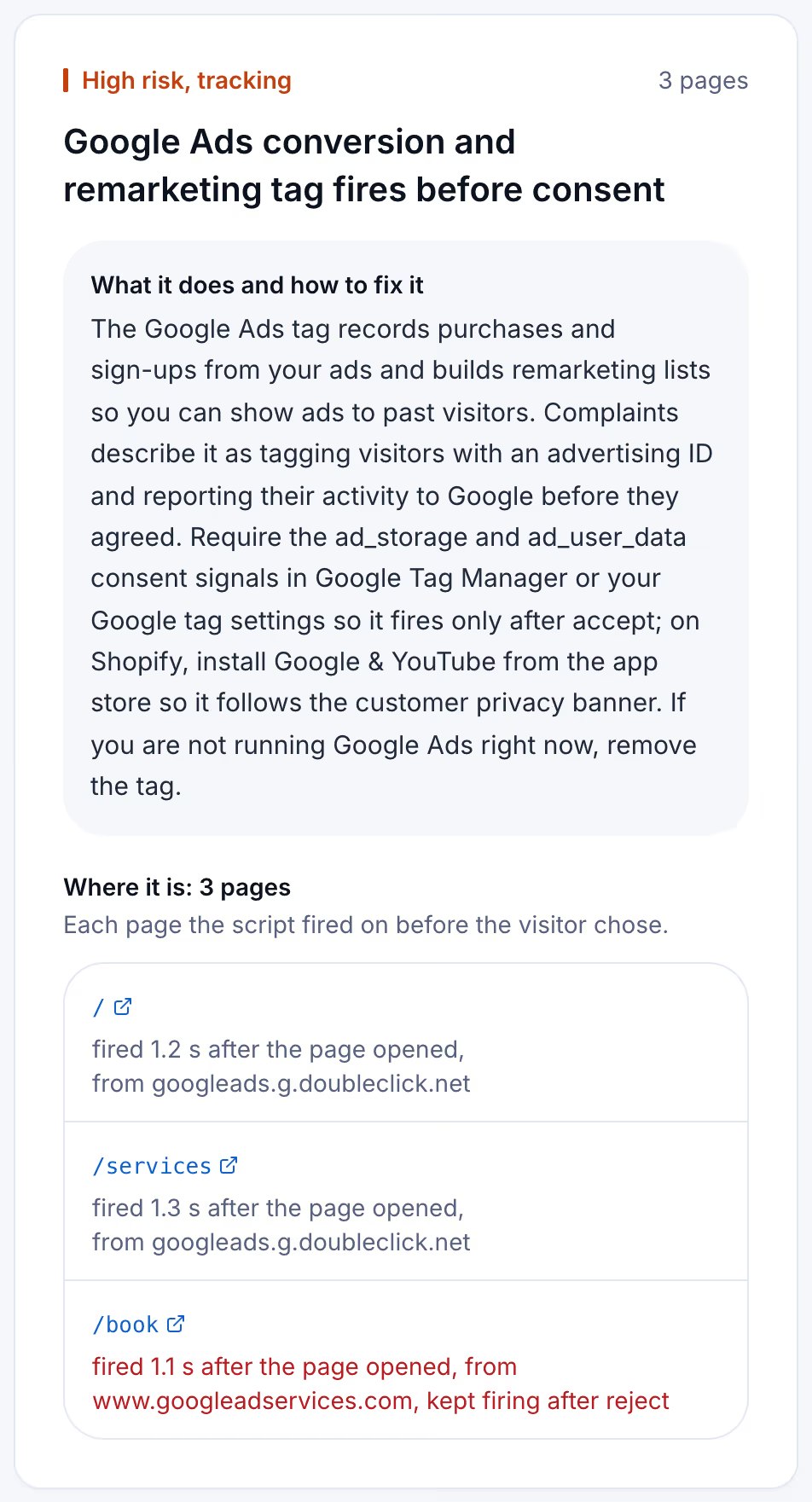
The scan logs every request from the moment a page starts loading until the network goes quiet or 8 seconds pass, without clicking anything, and matches each one against the 43 scripts in its catalog. It then presses reject when a banner offers it, never accept, and watches 3 more seconds. The methodology page sets out the rules.
Keeping the banner working as the site changes
A banner that held everything in spring can leak by autumn. A new App Market app on Wix, a snippet pasted for a seasonal campaign, a new block with its own tracking on Squarespace, or an Accept-only banner someone simplified: each puts a request in front of the visitor's choice, and neither platform tells the owner.
A free scan is one dated snapshot of 5 pages. Suitcast's Monitor plan scans up to 100 pages every week, keeps every report with its PDF, and sends a weekly email naming the scripts that are new, the fixes that did not hold, and the new filings that match the site by state, industry or script. It costs $39 a month or $390 a year, less than one hour of a privacy lawyer's time. A dental practice on Squarespace running Google Ads, or a salon on Wix with a Pinterest tag in its custom code, gets the same check every week without asking anyone. An agency that builds on both platforms covers five client sites on Pro for $79 a month or $790 a year, with its own name on each PDF. The pricing page compares the plans.
Limitations
This guide quotes Squarespace's and Wix's help centers, Google's Analytics help page on Squarespace, California Penal Code sections 631, 637.2 and 638.51 and the enrolled text of Senate Bill 690, all read on September 26, 2026. The platforms change their banners and help pages without notice; Wix moved new sites to Usercentrics for Wix, and older sites may still run the previous banner. Whether a given setup breaks CIPA is a question for a lawyer and a court, not a scan. Nothing here is legal advice; the not legal advice page says what a score and a count mean.
A scan sees only what leaves a visitor's browser, and it records requests, not cookies alone. Google's consent mode can send cookieless requests while consent is denied, so a Google tag that a banner holds in that way still appears as a request. The complaint counts are verified federal filings plus state filings with a public source, and state-court coverage is partial, so each count is a floor; the dataset explains how cases are counted.
Suitcast identifies risk indicators. It is not legal advice and does not determine compliance.
Last updated September 26, 2026.